

Skip to content
View in the app

A better way to browse. Learn more.

Lightning Scriptz

A full-screen app on your home screen with push notifications, badges and more.

To install this app on iOS and iPadOS
  1. Tap the Share icon in Safari
  2. Scroll the menu and tap Add to Home Screen.
  3. Tap Add in the top-right corner.
To install this app on Android
  1. Tap the 3-dot menu (⋮) in the top-right corner of the browser.
  2. Tap Add to Home screen or Install app.
  3. Confirm by tapping Install.
***You must have 1 (no bullshit) post to download files, and you are only allowed 1 file per day.***

Known Bots 4.0.1

(0 reviews)

1 Screenshot

This XenForo 2.x addon adds additional definitions for bot detection in sessions.

This allows more accurate indication of the number of users vs robots online at any given time.

Requirements

This addon requires PHP 7.0.0 or higher and works on XenForo 2.x

Usage

When you look at Current Visitors, you'll see additional robots identified - also look at the "Robots" list on that page http://www.example.com/community/online/?type=robot

We also add the current robot count to the Members online widget and the Online statistics widget (from the current visitor page). This can be disabled via the options.
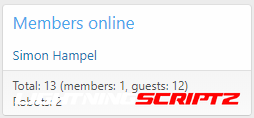
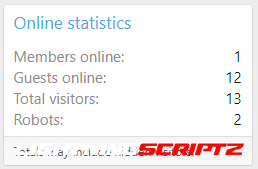
1574032520691.png 1574032528995.png

User Feedback

You may only provide a review once you have downloaded the file.

There are no reviews to display.

Account

Navigation

Search

Search

Configure browser push notifications

Chrome (Android)
  1. Tap the lock icon next to the address bar.
  2. Tap Permissions → Notifications.
  3. Adjust your preference.
Chrome (Desktop)
  1. Click the padlock icon in the address bar.
  2. Select Site settings.
  3. Find Notifications and adjust your preference.