






.png.a21833e66a7223c61c847e636c0b01b6.png)
.png.0e8e793207b01d49223a6c19108d49a0.png)
.png.a07c426cd16ada82db16c5973a63fcf7.png)

.png.b4e29a2934641edf6bb7a7089621b9a8.png)

.png.08a5c37bbd773cf7c542dce0d4cac7b4.png)
.png.8a5c688c44e902126c81c27e0cc02017.png)


.png.d99bd7ce53b41e7ad32c14566b2b9469.png)
.png.1b75b5b12dada110a283e0e36d0af55c.png)



.png.45a4041e0e04e6d203fa7b0f3f3055fa.png)
.png.0b107246c977d022aaa91f868e1981df.png)

.png.cb343428f08ef110b77d2af301afd6c3.png)
.png.0d7789bb4e80096ac5e125d444d83f6f.png)
.png.7abe73915118bfe832f8164b19ef20f7.png)
.png.6ba8a4f53a6d202ef7d1995fa6b668b6.png)
.png.373de10c704716f25e1fced5144feccb.png)
.png.09aa8702360afe3c043079bdd369fd83.png)
.png.a0c4b7d8a9fd18773c636e107aff7792.png)
.png.bf4bbe96cb9f93bf02aba0274f2bc5bb.png)
.png.3745b276525c2c75aa05783175fb6fe1.png)

.png.dbbc4fc69981f5c747a2802a6c821651.png)


About This File
This application lets your members choose an image to display their "mood" in various places all over the IPS Suite.
Features:
Frontend
Members
Members in groups allowed to use the moods application will be able to update their own mood anywhere it's displayed on the page with a modal form.
Members, based on some settings, can decide to show or not a log of all their mood updates in a new tab in their profile.
Locations (mobile view is also supported)
Global user menu
Hovercards
Profiles (3 different locations)
Topics
Comments (including PMs)
Reviews
Announcements
Downloads Files
Gallery Categories
Gallery Albums
Gallery Images
Online Users
Staff Directory
Report Center
Manual integration for Pages (CMS) templates is supported, too!
Widgets
Member Mood (Logged In): shows the mood of the member currently logged in.
Member Mood (Static): shows the mood of a specific member (chosen when setting up the mood).
Recent Mood Updates: shows a list of the latest mood updates.
ACP
Moods
Add/edit/delete mood images.
Enable/disable specific moods.
Set any specific mood as the default one.
Deleting a mood resets all members to use the current default mood.
Mood names are translatable if your community uses multiple language packs.
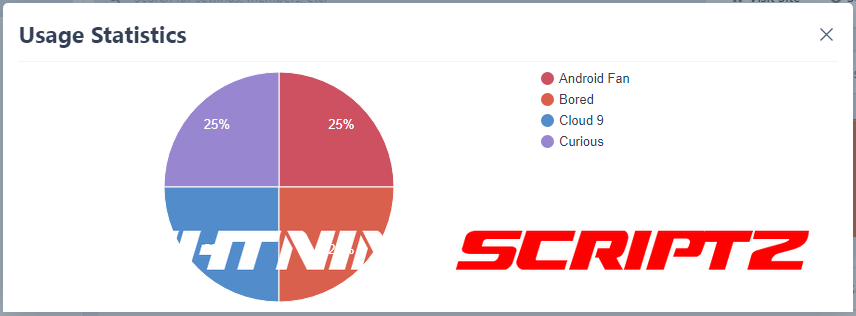
Pie chart to get a global view of all the moods in use and the most used ones.
Tool to sort moods based on filename or name with an additional option for the default mood.
Warning if some disabled moods are currently in use by members and a tool to mass update them to something else.
Settings
Select which groups can use moods. Scondary groups are checked too!
Enable receiving notifications when a followed member updates their mood.
Exclude certain themes from showing moods.
Choose between SELECT or RADIO forms when members update their moods.
Options to enable/disable every area the moods show in (global user menu, topic view, profile etc).
Extra code on how to integrate the mood in Pages (CMS) templates (if the application is installed).
Radio form has an additional option to skip adding the names to save space.
History Logs
Enable/disable the mood updates logging (if enabled a new profile tab with all the updates each member made).
Option to enable/disable the profile tab globally or to let each member choose for themselves.
Option to enable a task for pruning history logs every X days/weeks.
Tools
A tool to mass import entire folders of images to use as moods:
A tool to remove legacy data from the previous 3.x version of the application.
All options allow to choose the new default mood image.
An 'Add' option to add the images to the current moods.
A 'Replace' option to wipe out the current moods, reset the data, and start from scratch.
Supported ExtensionsAchievements: setup rules to provide points or badges when a member updates their mood.
IP Addresses: every mood update logs the IP which is fully integrated in the 'IP Address Tools' member area.
Edit Member: allows to edit the mood and profile tab setting editing a member.
Member History: additional account activity entries when editing a member.
Member Sync: merging or deleting members doesn't leave orphan data around.
Notifications: all notification types supported (email, inline, push).
Profile Tab: a new tab that show all mood updates the member has made.
Stream Items: mood updates will also show as extra items in the activity stream.
Notes:
Each purchase entitles you to use the application on a single Community installation.
What's New in Version 4.0.3
Released
Added an option to display the mood at the bottom of the profile's sidebar.
Fixed "Undefined array key 'image'" in ACP.
Fixed wrong storageExtension value in the Mood form in ACP.
Fixed reserved word
offsetin MySQL queries not using backticks.Fixed adding a mood image with the same name overwriting the previous mood image.
Fixed mood not showing anymore in the mobile menu after the rank badge changes in 4.7.
Fixed the "Member Mood (Select)" widget trying to delete a non-existent language key on removal.
You may only provide a review once you have downloaded the file.
There are no reviews to display.