4.7 Applications and Plugins
136 files
-
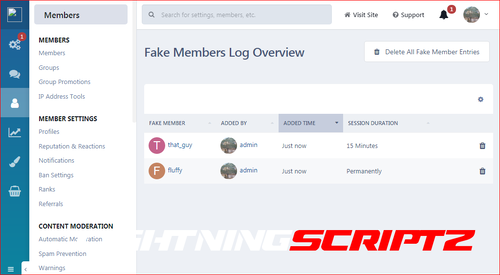
This app will allow the admins to add fake members in the online list. When you add a fake member online, you can also add the number of minutes that you want that particular member to be online. A task will run every half hour to remove the expired fake sessions from the online list. This can be very useful for start up forums as well as for those forums where there is not much activity. It will make the forum look busy and it might attract new users and boost the activity.
To keep things real, fake members will appear to read random topics, which they are allowed to view permission wise. You can select a certain forum or forums, whose topics you do not want to be showed up as being read from the fake members in the online list.
You can view all fake members that have been added to the online list at the app 's log page.
- 5 Downloads
-
Chatbox+ is an application that uses Ajax calls to the server to get new messages. Supports room chat, club chat and the private one-2-one chat. The chat boxes can display in widget, new page, or floating on the bottom right to allow member easy to chat with each other.
Demo: https://demo.ipsappzone.com/chatbox/room/1-public/
===============================
‼️ Using the Chatbox on Cloud may result in limited connections and potential blocking of Ajax requests.
===============================
⭐Features:
Private one-2-one chat:
Chat boxes display on bottom right allow member to chat with each other.
Multi chat at same time.
Permission for who can use the private chat.
Ability to select skin for each box.
Load more messages on scroll up (or down).
Easy to find member name to start the chat.
Sound notification for new message.
Report messages.
User online status.
Minimize and close chat boxes.
Ban settings.
Supports Clean Text Input with emoji, Youtube, URL, images, audio files, Giphy plugins,
Supports Lazyload images.
Interval in milliseconds.
Flood control.
Message length limit.
Permission to edit/delete messages.
Fully responsive - will adapt to mobile, tablet, desktop.
Group Chat
This feature is an extension of Member Chat to allow users to create a group and invite people to chat.
Option to set maximum users in a group.
Users can leave group whenever they want.
Displaying users list in a group.
System notification when user joins/leaves group.
Group owner can rename the group.
Permission for who can invite people to join group.
Rooms & Clubs Chat
Admin can create multiple rooms, display rooms in widgets, or a new page.
Club owner can create a room.
Announcement & Rules for each room.
Online Users list.
Allow guest to join and chat with their custom nickname and random avatar.
Show online users in the panel or popup.
Auto schedule: You can now set specific times for your room to automatically open and close.
Global Chat:
Show room in a a floating popup on the bottom of the pages so users can chat anywhere.
Toggle show/hide the popup.
Option to hide popup chat on mobile.
User controls:
On/Off sound notification.
Open chat in a popup.
Select skins.
Moderator controls:
Edit Announcement.
User blocking system:
Display moderator who blocked the user.
Ability to add the reason.
Auto unblock user after X minutes.
Clean room (delete all messages).
Quick edit/delete a message.
System messages to notify when:
New content posted from 3rd-party apps, supports:
Forums (new topic, new reply)
Downloads (new file, new comment, new review)
Pages (new article, new comment, new review)
Gallery (new image, new comment)
Blogs (new entry, new comment)
Calendar (new event, new comment)
Status updates, status replies
New registration.
Videobox (new video, new comment, new review)
Musicbox (new song, new comment)
Tutorials (new article, new comment)
New announcement.
New donation.
User joined/left room.
Auto Messages (Chat Bot)
Create multiple messages with cycle time in seconds.
Select a member as a Bot to post the messages automatically every X seconds.
The auto messages run on client-side, will not be saved to database for the best performance and saving database.
Archive messages:
Permission for who can view archive messages.
Search messages by member name, guest name, content, time.
Sorting messages by time, content, chatter name.
Edit/Delete/Report message.
Other features:
Input message:
Clean text: only supports URL, image URL, Youtube URL, GIF from GIPHY, upload image
Editor: You can use full formatting from Editor: color, bold, size, emoticons... and all Editor's plugins.
Many stylish designs available:
5 color skins.
3 styles for messages:
Standard
Bubbles
Condensed
Donation & SuperChat (requires IPS Commerce) *NEW*
Allow users to donate directly in the room.
After making a payment, the message will be highlighted in a different color.
Ability to select permission for who can donate.
Select a donation goal from Commerce.
Easy to setup the color for SuperChat based on the donation amount.
Sending system notification when someone donates to the room.
Tools for admin:
Delete all system messages
Delete all room's messages
Delete all conversation
Import messages from the Chatbox FREE
Extra features:
Supports playing a song from Musicbox
Report center integration allows users to report bad massages.
Auto loads old messages when scrolling down (or up).
Highlight the message row if someone mentions you.
Flood control, max messages, limit characters, sorting messages...
Display number of online users in Chat menu.
Display counter of characters when typing message. *NEW*
Support IPS Link Filter for disallowed/allowed links. *NEW*
Ignored Users.
Lazy load images.
Fully responsive.
- 6 Downloads
-
About This File
This application lets admins add a VIP Status to specific members promoting them to a different group. It can be either a permanent promotion or a temporary one. It can be used to give higher privileges to helpful members of the community (for example hiding ads for them).
Features:
Setting to specify which group VIP members are moved to.
Setting to specify which group expired VIP members are moved to. It also supports "Original Group" as an option.
Setting to specify the default VIP period duration when adding a new member.
Setting to change the icon used to display the members' VIP status.
Settings to control the VIP status icon display (global user bar + topic user info).
Option to send a PM notification about the VIP status when members are promoted, when it's expiring, and when it expires.
Every VIP status change is logged in the member history in ACP.
An icon is added in the user bar near the notification icon and in a topic's user info while the user is in the VIP group.
Widget to display to members more details about their VIP status start/expiration.
Expired VIP Members are automatically moved out of the VIP group by a task.
- 2 Downloads
-
About This File
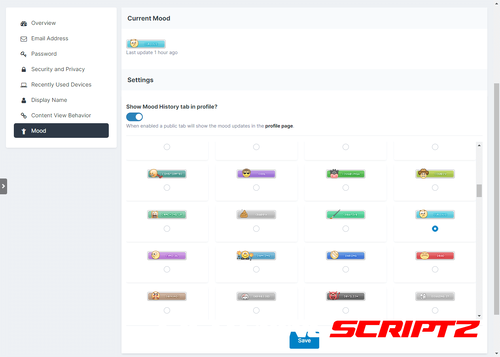
This application lets your members choose an image to display their "mood" in various places all over the IPS Suite.
Features:
Frontend
Members
Members in groups allowed to use the moods application will be able to update their own mood anywhere it's displayed on the page with a modal form.
Members, based on some settings, can decide to show or not a log of all their mood updates in a new tab in their profile.
Locations (mobile view is also supported)
Global user menu
Hovercards
Profiles (3 different locations)
Topics
Comments (including PMs)
Reviews
Announcements
Downloads Files
Gallery Categories
Gallery Albums
Gallery Images
Online Users
Staff Directory
Report Center
Manual integration for Pages (CMS) templates is supported, too!
Widgets
Member Mood (Logged In): shows the mood of the member currently logged in.
Member Mood (Static): shows the mood of a specific member (chosen when setting up the mood).
Recent Mood Updates: shows a list of the latest mood updates.
ACP
Moods
Add/edit/delete mood images.
Enable/disable specific moods.
Set any specific mood as the default one.
Deleting a mood resets all members to use the current default mood.
Mood names are translatable if your community uses multiple language packs.
Pie chart to get a global view of all the moods in use and the most used ones.
Tool to sort moods based on filename or name with an additional option for the default mood.
Warning if some disabled moods are currently in use by members and a tool to mass update them to something else.
Settings
Select which groups can use moods. Scondary groups are checked too!
Enable receiving notifications when a followed member updates their mood.
Exclude certain themes from showing moods.
Choose between SELECT or RADIO forms when members update their moods.
Options to enable/disable every area the moods show in (global user menu, topic view, profile etc).
Extra code on how to integrate the mood in Pages (CMS) templates (if the application is installed).
Radio form has an additional option to skip adding the names to save space.
History Logs
Enable/disable the mood updates logging (if enabled a new profile tab with all the updates each member made).
Option to enable/disable the profile tab globally or to let each member choose for themselves.
Option to enable a task for pruning history logs every X days/weeks.
Tools
A tool to mass import entire folders of images to use as moods:
A tool to remove legacy data from the previous 3.x version of the application.
All options allow to choose the new default mood image.
An 'Add' option to add the images to the current moods.
A 'Replace' option to wipe out the current moods, reset the data, and start from scratch.
Supported Extensions
Achievements: setup rules to provide points or badges when a member updates their mood.
IP Addresses: every mood update logs the IP which is fully integrated in the 'IP Address Tools' member area.
Edit Member: allows to edit the mood and profile tab setting editing a member.
Member History: additional account activity entries when editing a member.
Member Sync: merging or deleting members doesn't leave orphan data around.
Notifications: all notification types supported (email, inline, push).
Profile Tab: a new tab that show all mood updates the member has made.
Stream Items: mood updates will also show as extra items in the activity stream.
Notes:
Each purchase entitles you to use the application on a single Community installation.
- 2 Downloads
-
This is a plugin to add a new widget for Status Updates with essential enhancements.
Features:
Reactions.
Upload Attachments.
Toggle between rich text & plain text.
Toggle on/off member photos.
Ajax pagination.
Ajax for edit/delete/hide/unhide/lock/unlock options.
Ajax for the new status, reply.
View all replies in a popup.
Option to set how many status updates should be loaded per page.
Option to set the widget's title.
Option to truncate lines.
Demo:
http://demo.ipsappzone.com/status_update_widget.html/
- 0 Downloads
-
News application allows you to add news for your community.
Includes support for news categories and comments.
Click here to read my IPS Marketplace purchase guide before purchasing.
Features:
NEW RSS import news feeds into the News application.
Create discussion topics for newly created news items.
Integration with IPB share links, so news can be shared by members.
Built in support for IPB comments feature.
Group permissions for viewing, adding, updating and moderating news.
News categories and subcategories to organize news entries.
Optional RSS feed export, including support for individual RSS feeds export for each news category.
Integration with IPB follow feature, including the option to follow news entries or news categories.
Included widgets displaying the latest news on board index.
Support for the IPB search feature, including view new content support.
- 0 Downloads
-
This plugin will convert status updates (and its replies) into topics.
Conversion option:
Topic title
Forum where to create the topic
Settings:
Delete the status update after convert to a topic
Groups allowed to convert a message to a topic
- 0 Downloads
-
Show your groups legend in the Who's Online and Recently Viewed widgets, sorted in the order you specify and linked to the search engine.
It's handy so people know what those group prefixes and suffixes mean.
- 0 Downloads
-
Youtube Importer is an application allows you to import Youtube videos to Forums, Pages, and Videobox manually or automatically.
Features:
- Import videos from Youtube feed: User, Channel, Playlist, Search Term
- Import videos to Forums.
- Import videos to Pages.
- Import videos to Videobox.
- Creating tasks to import videos automatically.
- Running task manually to import latest 10 videos or all videos in channel, user feed, playlist.
- 0 Downloads
-
Nice little widget that shows the members who have visited the forum in the last X hours.
Features:
- Number of hours adjustable
- Select which groups can see the widget
- Display "Most members online"
- Set the number of members to display
- Groups that should not be listed can be selected
- Members can be selected by their last visit, group or name for sorting. You can also choose in the settings whether names or avatars (in two sizes) are displayed.
- 0 Downloads
-
VideoBox is an application that allows sharing videos, the best choice to run your own Movies/TV Shows website.
Live demo: http://demo.ipsviet.com/video/
Features:
2 display modes: Grid view & List view. Categories/subcategories. Custom fields for video's information. Protected custom fields that only display for logged members, or who liked the video. Search videos by custom fields. Video Collections: create/edit/remove the collections for your videos. Widgets: top poster, top videos, random videos, featured videos in a slider, collections in a carousel, quick search by custom fields,... Pages system: easy to create a new page with custom content. Uploading or using external video URL (supports: mp4, m4v, webm, m3u8, youtube, vimeo, dailymotion). Using VideoJS to play video formats: mp4, m4v, webm. Support VTT captions, preroll video for advertising purpose *New* Watermark on the video player. Media Tags system to define your custom player embedded from any video services (YouTube, Vimeo, Dailymotion...). Live Streams from Twitch.tv and Youtube.com Ability to post a topic when a video is submitted *New* Tags Filter *New* View video in lightbox *New* Friendly URL. Comment system. Rating system. Following system. Clubs Reactions Supports Nexus (Commerce) to sell and buy videos. *New* Supports all Points systems. *New* Points for new video Points for new comment Points for new review Points for reaction Lazyload *New* Tags. Latest Videos RSS feed.- 10 Downloads
-
This app allows you to create collection from topics and posts and show in TabView and GridView using tons of customization options.
- 0 Downloads
-
This application allows you to showcase testimonials on your site.
Demo: http://demo.ipsappzone.com/testimonials/
Main Features:
Display testimonials friendly on sliders. There are 3 slider's styles.
Option to sort descending/ascending or random.
Responsive layout (desktops, tablets, mobile devices).
Support caterories.
Enable/Disable Title on testimonial.
Enable/Disable Rating on testimonial.
Enable/Disable testimonial must be approved by moderators.
Enable/Disalbe other informations: Company, Job, Website.
Permissions to View, Submit and Manage.
Fully manageable (edit, show/hide, delete).
RSS for latest testimonials
- 0 Downloads
-
This application will allow users from specific user groups to add notes to members, in order to have better control of the member's life in the community
Adding Notes: Users from specific groups can add notes in two places:
+ Create menu
Directly on user Profile, on a new tab called Notes, where notes can be edited or deleted, if you have permission to do it.
Directly on member's posts
Features:
New tab called Member Notes on ModeratorCP -> Member Management to display notes from all members, where notes can be edited or deleted, if you have permission to do it.
Number of notes on user's posts, linked to the tab in his profile. You can also add a note from the post.
Number of notes on user's personal card (mini profile on hover user link)
Widget to display the latest notes.
Notification to all users who can view notes when someone gets a new note.
Ability to send a private message to the member with the note content.
Group permissions:
Can view notes
Can add notes
Can edit notes
Can delete notes
Settings:
Show the PM option on Member Notes form
- 0 Downloads
-
This plugin adds your community version to the end of the copyright bar. It has only one setting that allows you to hide the version number from certain groups.
- 0 Downloads
-
Tired of boring messages spread across your site? then liven it up by downloading Sticky Notes, this application will allow you, or if you have selected members, To post global Sticky Notes to other members on your board, Users can easily dismiss each Sticky Note and then can even drag and drop them around their screen
Global Sticky Notes ( ACP )
Create and display unlimited global Sticky Notes to your members
Choose what user groups can see each Sticky Note
Add a signature ( username and avatar ) to the bottom of each Sticky Note allowing members to see who wrote it, as a clickable link to said profile
Choose the colour of each Sticky Note
Choose from 9 different positions to show each Sticky Note
Set an expiry time and date for each Sticky Note with an option to just show it until the user dismisses it
Select where to show each Sticky Note from a list of your installed applications or to just show it everywhere (For example only show the Sticky Note when users are browsing the forums or the downloads section etc )
Use a wide range of tags to engage your members more personally
Global Sticky Notes Front End Admin
The admin/s can create new global Sticky Notes from the front end via the create menu ( Only admins can use this feature )
Personal Sticky Notes ( MEMBERS )
Allow chosen user groups to send personal Sticky Notes to other members
Members can receive an unlimited amount of Sticky Notes
All Sticky Notes are dismissable
All personal Sticky Notes will automatically add the username and avatar unless you have selected in the ACP to allow anonymous Sticky Notes (read ACP Menu below)
Personal Sticky Notes will display the time the note was sent to the member for example "just now", " 5 minutes ago", "4 hours ago", "16th July" and so on
Members can either send Personal Sticky notes to members by their hovercard or via their forums topics and you can also send them via the users create menu
Each (Nonanonymous) personal Sticky Note has a reply icon allowing users to easily reply to other members' notes
Front End ( PERSONAL STICKY NOTES )
Added a link to the user drop-down menu linking to the new tables listed below
Shows a table listing all the members who received Sticky Notes with the ability to restore the note bringing it back to life
Shows a table listing all the members who sent Sticky Notes with the ability to edit and resend or just resend the Sticky Note, it also shows if the user has dismissed the Sticky Note
Members can view all their sent and received Sticky Notes between them and X member
All tables can be sorted by time and date and also have an advanced search for members or a time and date stamp
Widgets
Show a widget with a list of members who have sent the most Sticky notes
Show a widget with a list of members who have received the most Sticky Notes
ACP Menu
Sticky Notes (Global including personal)
Choose to use either a pin or a bit of sticky tape to hold the Sticky Note
Choose to show or hide Sticky Notes on mobile or tablet devices
Change the z-index of the Sticky Notes ( This is only needed for some custom themes you might have installed )
Allow users to drag and drop the Sticky Notes around their screen by hovering over the pin and dragging the Sticky Note
Personal Sticky Notes
Allow members to send anonymous Sticky Notes to other members (admin can view all Sticky Notes in the ACP read below)
Read all the Sticky Notes sent by members in a nice and tidy table and you (being the admin) can even view the sender if they sent it anonymous
Select what member groups can use personal Sticky Notes
Choose from 9 different positions to place the Sticky Notes
Mass delete Sticky Notes by either "ALL", "READ", or "UNREAD", by individual members or by chosen user groups
Choose the colour of personal Sticky Notes
Member Group ACP Menu
Choose how many personal Sticky Notes each member group can send per day, with an unlimited option
Members Settings ACP Menu
Block individual members from using personal Sticky Notes
Block individual members from receiving Sticky Notes
How to install
If you have version 1.0.3 or below installed, uninstall it as it's a plugin and will conflict with the new application
Go to your ACP and applications then click to install and upload the downloaded .tar file
- 0 Downloads
-
Slider Maker is an application that allows you to create professional sliders, responsive layout and touch support for mobile devices. You can manually build your sliders by adding images, videos, content, animated layers. Or adding slides automatically from Clubs, Forums, Downloads, Calendar, Gallery, Pages, Videobox.
It’s focused on performance, stability, accessibility to providing the best experience for user experience in mind. Providing a clean and intuitive user interface in ACP and a smooth experience for the end-users.
Back-end features:
Create and manage sliders with a clean and intuitive user interface in ACP.
Customize the slides with different layers: Heading, Content, Image, Video (Youtube & Vimeo).
Sort slides and layers with a simple drag and drop.
Easy remove or duplicate a slide.
Auto builds a slider from content items (supports Clubs, Forums, Pages, Downloads, Gallery, Blog, Calendars, Our Picks, Nexus Products, Videobox, Tutorials).
Auto generates random CSS backgrounds for content items that have no images.
Export and import allow you to create backups or move sliders between installations.
Preview all your changes directly in the ACP.
Breakpoints to change the configuration of the slider depending on screen size.
Permission to view sliders.
Front-end features:
Fully Responsive
Touch swipe
Transition effects: Fade & Slide
Carousel layout
Animated and static layers
Full Width and Full Window
Full screen
Auto Height
Infinite scrolling
Keyboard navigation
Thumbnails
Lazy loading
Video support (Youtube and Vimeo).
Different sized images
JavaScript breakpoints
Display slider in IPS widget (top, bottom, sidebar), or using slider's code to templates to display it everywhere.
NEW Viewing content in a popup (supports Downloads, Forums, Pages, Calendars, Videobox)
Examples:
https://demo.ipsappzone.com/slidermaker/example1.html/ (Gallery with animated layers and thumbnails)
https://demo.ipsappzone.com/slidermaker/example2.html/ (Slider with animated layers)
https://demo.ipsappzone.com/slidermaker/example3.html/ (Carousel)
- 0 Downloads
-
This resource will show a box with the latest topics/posts on board index. The list is automatically updated at every X seconds.
ACP Settings:
Block position: Before of After forums categories
Display topic author photo
Hide the Recent Topics block from mobile devices
Hide the Recent Topics block from small screens devices (tablet, netbook, notebook, etc.)
Number of topics to show
Ability to update member's personal number of topics setting to meet the Admin CP setting
Display Moderator Options: Moderator Options will appear only to those who can moderate content
Show block to specific groups
Display topics from Clubs
Exclude Forums: option to select which forums to NOT pull topics from
Display effect and flash message when the list get updated
Time to automatically update the topics list
Member Setings (Account Settings):
Display Recent Topics
Number of topics to show
Exclude topics from
- 0 Downloads
-
- 0 Downloads
-
This application will allow your members to upload music tracks to play on their profiles with a nice tidy custom audio player
Features
Adds a custom java-script / jquery / Ajax music players to users profiles ( if they have uploaded tracks that is )
Allow your members to upload multiple music tracks to their profiles
Adds a playlist with all their uploaded music allowing to switch tracks easily
Easily edit the track names by clicking and holding the track name in the playlist without having to reload the page
Easily re-position the tracks by dragging them and dropping them into your chosen positions
The audio player has 5 buttons
Repeat ( this will repeat the playing track )
Next ( skip to the next track )
Previous ( go to the last track )
Volume ( Toggles volume bar )
This will show and volume bar that you can drag with 2 more buttons allowing you to turn it up or down
Play / Pause ( Does what it says on the tin )
Easily delete each track without having to reload the page ( this will show a pop-up asking to confirm the deletion )
Members can customize their audio player's button / volume / progress bar from a choice of 8 colors what are either solid or with a shadow
Set auto play function so members' tracks will auto-play when the page loads
Allow members to add other members' tracks to their playlists
This will not duplicate or copy any audio files it will just add the ability for the track to be played on other members' playlists
Tracks added to playlists via sharing will not count towards the user's uploads count as they are not uploading a new track
Members can toggle the ability for other members to add their tracks to their playlists easily via the audio player
When a member grants permission for their tracks to be shared a new add to my playlist icon will appear next to their track names
If a member adds another member's track to their playlist and the uploader decides to delete their track, the track will also be removed from all playlists it has been added to
Admin Member Group Settings ( These are set per group )
Can upload audio tracks
Select the maximum upload size per track
Select the maximum upload limit per batch of uploads
Select the number of total tracks the member can upload altogether
Extensions
Members Shop
Add a item to the member's shop allowing you to charge points for members to upload tracks
This will override all group permissions set except the total uploads per batch so if you only want to allow users to add tracks via shop items then you need to remove their permissions to use it and the item will be the only way they can add tracks
- 1 Downloads
-
This resource will allow members to send notifications to other members.
Groups permissions:
Can send notifications to members
Can send notifications to groups
Content items required to send notifications
Restrict new notifications per hour/day/week or month
Member Restriction:
Can send notifications?
- 2 Downloads
-
This resource uses The Movie Database API to grab data from Movies/TV Shows to your site.
All you have to do is type a word from the movie/TV show title and then a list of matches will show up. From now on, with just a click, you will have the submission form:
Title
Subtitle, if available
Description
Poster
Status
Release Date (for Movies)
Genres
Language
Homepage
IMDB link
Budget
Revenue
Running Time for movies or Episode Time for TV shows
Season (for TV Show)
Number of episodes (for TV Show)
Tabs:
You will also have tabs to display:
Cast (with a link to a popup listing all their data)
Crew (with a link to a popup listing all their data)
Trailers (with videos from Youtube)
Latest Reviews on TMDB
Similar Movies or Similar TV Shows (will list all similar movies/TV shows and again with a click, you can have them in your database)
All the tabs, except Information (the main one with the movie/TV show description), can be disabled via setting.
TMDB API Key:
You can get your free API Key on the TMDB site: https://www.themoviedb.org/settings/api
Multi-Language:
TMDB supports 62 languages. You just have to choose the one in the ACP setting.
Other features:
Fully integrated into the framework: Rest API, categories, extra fields, notifications, search, tags, follow, reactions, promote, etc.
Settings:
Settings to control the app behavior in several places/situations.
- 1 Downloads
-
This application will display the country flag of users in several places of the entire suite, including third-party resources. It uses Geolocation to grab the country when a new user registers an account or when existing users log in on your board. Clicking on the flag will give you a list of all users from that country.
Important Notice:
IPS Geolocation is an active license perk so you need to have an active license to countries get picked by IP Address.
Usage:
New members: new members will have their country detected when they register the account
Existing members: Country will be recognized when a member is online or if allowed by the admin, go to Account Settings and pick your country.
Settings:
Display country flag everywhere: will display the country flag in several places from official apps like on Forums, Gallery, Blogs, Pages, Gallery, Downloads, including its widgets and third-party resources. If disabled, will display the country name + flag only on the user profile.
Groups allowed to change the country: users from selected groups will be able to change their country on Account Settings. Sometimes Geolocation picks the wrong country, so the user will be able to fix it.
- 2 Downloads
-
This plugin allows members to add a gallery to their post.
Main Features:
Enable/disable
Groups can use
Responsive Gallery
Customization: width/height, auto play, thumbnail, transitions, speed, image crop
There is a form in the editor that helps members easy to add image URLs, captions, or select albums (from Gallery app)
Demo: https://demo.ipsappzone.com/topic/1013-gallery-test/
- 4 Downloads
-
EasyPopup is a simple application to create the modal popups for your site.
Some features:
Width/Height for your popup.
Transition open/close: FadeIn/FadeOut, SlideIn, SlideUp, SlideDown, SlideBack.
Transition speed.
Positions: Top Left, Top Center, Top Right, Middle Left, Middle Center, Middle Right, Bottom Left, Bottom Center, Bottom Right
Background color.
HTML content or upload image.
Supports advertisement tag in the HTML code: {advertisement="key"}
Auto close and show timer on popup.
Showing popups every page loads or every X minutes.
Waiting for X milisecond to show.
Easy to determine URL where to show popups.
IPS Member Filter System to show popups. (filter by groups, content count, joined date, last posted, last visited, reputation, member of the day....)
Demo: http://demo.ipsappzone.com/easypopup.html/
- 3 Downloads