IC5 Applications
36 files
-
Only for IPS 5.0.0/5.0.2 Does not work for IPS 5.0.3 and above
Chatbox+ is an application that uses Ajax calls to the server to get new messages. Supports room chat, club chat and the private one-2-one chat. The chat boxes can display in widget, new page, or floating on the bottom right to allow member easy to chat with each other.
Demo: https://demo.ipsappzone.com/chatbox/room/1-public/
===============================
‼️ Using the Chatbox on Cloud may result in limited connections and potential blocking of Ajax requests.
===============================
⭐Features:
Private one-2-one chat:
Chat boxes display on bottom right allow member to chat with each other.
Multi chat at same time.
Permission for who can use the private chat.
Ability to select skin for each box.
Load more messages on scroll up (or down).
Easy to find member name to start the chat.
Sound notification for new message.
Report messages.
User online status.
Minimize and close chat boxes.
Ban settings.
Supports Clean Text Input with emoji, Youtube, URL, images, audio files, GIPHY
Supports Lazyload images.
Interval in milliseconds.
Flood control.
Message length limit.
Permission to edit/delete messages.
Fully responsive - will adapt to mobile, tablet, desktop.
Group Chat
This feature is an extension of Member Chat to allow users to create a group and invite people to chat.
Option to set maximum users in a group.
Users can leave group whenever they want.
Displaying users list in a group.
System notification when user joins/leaves group.
Group owner can rename the group.
Permission for who can invite people to join group.
Rooms & Clubs Chat
Admin can create multiple rooms, display rooms in widgets, or a new page.
Club owner can create a room.
Announcement & Rules for each room.
Online Users list.
Allow guest to join and chat with their custom nickname and random avatar.
Show online users in the panel or popup.
Auto idle after X minutes.
Auto schedule: You can now set specific times for your room to automatically open and close.
Global Chat:
Show room in a a floating popup on the bottom of the pages so users can chat anywhere.
Toggle show/hide the popup.
Option to hide popup chat on mobile.
User controls:
On/Off sound notification.
Open chat in a popup.
Select skins.
Moderator controls:
Edit Announcement.
User blocking system:
Display moderator who blocked the user.
Ability to add the reason.
Auto unblock user after X minutes.
Clean room (delete all messages).
Quick edit/delete a message.
System messages to notify when:
New content posted from 3rd-party apps, supports:
Forums (new topic, new reply)
Downloads (new file, new comment, new review)
Pages (new article, new comment, new review)
Gallery (new image, new comment)
Blogs (new entry, new comment)
Calendar (new event, new comment)
Status updates, status replies
New registration.
Videobox (new video, new comment, new review)
Musicbox (new song, new comment)
Tutorials (new article, new comment)
New announcement.
New donation.
User joined/left room.
Auto Messages (Chat Bot)
Create multiple messages with cycle time in seconds.
Select a member as a Bot to post the messages automatically every X seconds.
The auto messages run on client-side, will not be saved to database for the best performance and saving database.
Archive messages:
Permission for who can view archive messages.
Search messages by member name, guest name, content, time.
Sorting messages by time, content, chatter name.
Edit/Delete/Report message.
Other features:
Input message:
Clean text: only supports URL, image URL, Youtube URL, GIF from GIPHY, upload image
Editor: You can use full formatting from Editor: color, bold, size, emoticons...
Many stylish designs available:
Standard
Bubbles
Condensed
Donation & SuperChat (requires IPS Commerce)
Allow users to donate directly in the room.
After making a payment, the message will be highlighted in a different color.
Ability to select permission for who can donate.
Select a donation goal from Commerce.
Easy to setup the color for SuperChat based on the donation amount.
Sending system notification when someone donates to the room.
Tools for admin:
Delete all system messages
Delete all room's messages
Delete all conversation
Import messages from the Chatbox FREE
Extra features:
Report center integration allows users to report bad massages.
Auto loads old messages when scrolling down (or up).
Highlight the message row if someone mentions you.
Flood control, max messages, limit characters, sorting messages...
Display number of online users in Chat menu.
Display counter of characters when typing message.
Support IPS Link Filter for disallowed/allowed links.
Ignored Users.
Lazy load images.
Fully responsive.
- 4 Downloads
-
- 13 Downloads
-
This app supports the IPS Editor, Chatbox, and Chatbox FREE, allowing users to find and post the perfect GIFs from GIPHY, the world's largest library of animated images.
Features:
MPAA rating filter.
Search GIFs / Stickers
Recently used GIFs.
Trending GIFs (currently trending on the GIPHY homepage).
Supports the IPS Editor.
Supports Chatbox and Chatbox FREE:
Display button
Use the /giphy command to find GIFs.
Integrates with the Emoji Panel.
Native Giphy integration is now built into the core software. This application adds additional functionality as shown above and integrates with my other applications: Chatbox, Chatbox FREE
- 6 Downloads
-
Community Map is an application that allows users to put their exact or approximate location onto an interactive map. Create unlimited markers and map out the world!
Highlights:
Create unlimited marker groups for member meet-ups, exhibits, landmarks, highlights, shops, or other geographic listings. Maps can overlap in a global map.
Administrators can control what member groups are allowed to post to map
Import markers from Google Earth using a .kml or .kmz file
Integrates with Clubs. It shows club members on a dedicated club map, and the club location is shown on the global map.
Show Gallery images (as of 1.3), Calendar events, Calendar venues, and Page record addresses on the map
NOTE:
This is a RELEASE CANDIDATE version, so you may encounter issues or areas that need refinement, particularly with the layout and visual elements. Please test the app and share any findings in the support topic. New versions will be released to address any issues.
- 7 Downloads
-
EasyPopup offers a powerful, customizable solution for creating eye-catching popups on your website. Configure everything from size, position, and transitions to timing, content, and audience targeting. With IPS Member Filters, you can tailor popups to suit specific groups and boost user engagement effortlessly.
Features:
Width/Height.
Transition open/close: FadeIn/FadeOut, SlideIn, SlideUp, SlideDown, SlideBack.
Transition speed.
Positions: Top Left, Top Center, Top Right, Middle Left, Middle Center, Middle Right, Bottom Left, Bottom Center, Bottom Right
Background color.
Compose popup content using the Editor or HTML, or simply upload an image.
Supports advertisement tag in the HTML code: {advertisement="key"}
Auto close and show timer on popup.
Showing popups every page loads or every X minutes.
Waiting for X miliseconds to show.
Easily set specific URLs for popup display.
IPS Member Filter System to show popups. (filter by groups, content count, joined date, last posted, last visited, reputation, member of the day....)
- 5 Downloads
-
Enhance your site with beautiful, fully responsive Sliders and Gridview options that adapt seamlessly to any device.
Flexible Slider Customization: Choose from horizontal, vertical, or random modes; set autoplay, speed, duration, buttons, and more.
Gridview: Showcase your content in a stylish, organized layout.
Auto-Content: Automatically generates sliders from content in: Pages, Forums, Gallery, Downloads, Clubs, Commerce, and Videobox.
RSS Feed Support: Automatically fetch content from RSS URLs.
Custom Content Management: Easily add and manage custom content to your slider/gridview; drag & drop to sort, click to edit titles, upload images, and add links.
Thumbnail Caching: creates and saves thumbnail cache for faster loading.
Widget Support: use widget to display slider/gridview.
Popup View: quick view content in a popup (supports Forums, Downloads, Pages, and Videobox)
- 5 Downloads
-
This app allows members to add a gallery to their post by BBCode. (Supports Forums & Pages)
Not work on IPS Cloud because it requires editing PHP files.
Main Features:
Enable/disable
Groups can use
Responsive Gallery
Customization: width/height, auto play, thumbnail, transitions, speed, image crop
There is a form in the editor that helps members easy to add image URLs, captions, or select albums (from Gallery app)
- 4 Downloads
-
The Hide it application allows hiding content from posts in Forums, Pages and Downloads. It supports selectively hiding specific sections or entire posts.
This application does not work on IPS Cloud because it requires editing PHP files.
Features:
Select databases and categories for hidden content.
Specify user groups for hidden content.
Options for hiding specific content: links, images, attachments, code, or the entire post.
Options to unhide content:
Give a reaction
Leave a comment
Reaction or comment
Reaction and comment
Reload content in ajax after giving reaction to unhide content without reloading page.
- 10 Downloads
-
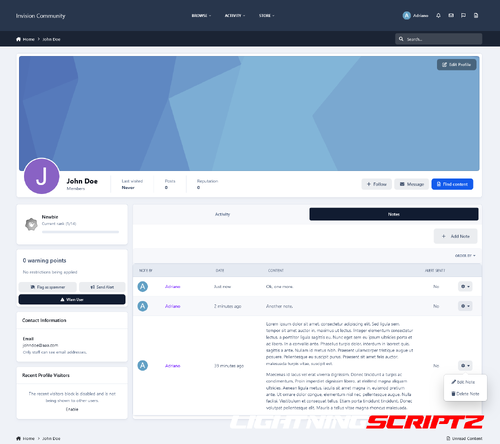
This application will allow users from specific user groups to add notes to members, to have better control of the member's life in the community.
Adding Notes: Users from specific groups can add notes in 4 places:
In the user Profile, on a new tab called Notes, where notes can be edited or deleted, if you have permission to do it.
In the user card (mini profile), if you have permission to do it.
Directly on member's posts.
In the Admin CP user profile → Member Notes tab.
Features:
A new tab called Member Notes on ModeratorCP -> Member Management to display notes from all members, where notes can be edited or deleted if you have permission to do it.
Number of notes on user's card stats (mini profile on hover user link).
Widget to display the latest notes.
A notification to all users who can view notes when someone gets a new note.
Ability to send a private message to the member with the note content.
Ability to send an alert to the member, with a different text, for those who can send alerts.
Group permissions:
Can view notes
Can add notes
Can edit notes
Can delete notes
Settings:
Display the PM option on the Member Notes form
Display the ALERT option on the Member Notes form
Number of notes per page on the Profile tab
Number of notes per page on the ModeratorCP tab
IMPORTANT:
Since hooks cannot be used, the option to display the number of notes on user’s posts has been removed in this version. A request was made to IPS so it may come back someday if IPS provides a way to do it.
- 7 Downloads
-
This resource uses The Movie Database API to grab data from Movies/TV Shows to your site.
All you have to do is type a word from the movie/TV show title, and then a list of matches will appear. From now on, with just a click, you will have the submission form:
Title
Subtitle, if available
Description
Poster
Status
Release Date (for Movies)
Genres
Language
Homepage
IMDB link
Budget
Revenue
Running Time for movies or Episode Time for TV shows
Season (for TV Show)
Number of episodes (for TV Show)
Tabs:
You will also have tabs to display:
Cast (with a link to a popup listing all their data)
Crew (with a link to a popup listing all their data)
Trailers (with videos from YouTube)
Latest Reviews on TMDB
Similar Movies or Similar TV Shows (will list all similar movies/TV shows, and again with a click, you can have them in your database)
All the tabs, except Information (the main one with the movie/TV show description), can be disabled via settings.
TMDB API Key:
You can get your free API Key on the TMDB site: https://www.themoviedb.org/settings/api
Multi-Language:
TMDB supports 62 languages. You have to choose the one in the ACP setting.
Other features:
Fully integrated into the framework: Rest API, categories, extra fields, notifications, search, tags, follow, reactions, promote, etc.
Settings:
Settings to control the app's behavior in several places/situations.
- 5 Downloads
-
Improve your experience with Invision Community with this powerful application that integrates your community with Discord easily. Synchronize roles and names, invite new participants without effort and configure the approval mechanism to manage access to your Discord server.
- 7 Downloads