IC5 Applications
36 files
-
- 5 Downloads
-
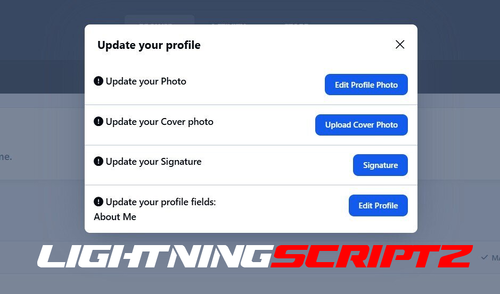
This app will display a popup or redirect user to a page reminding them to update their information before browsing the website.
Features:
Enable/Disable the feature.
Select user groups required to fill in the information.
Choose required information fields, including:
Profile photo
Cover photo
Signature
Profile fields
- 1 Downloads
-
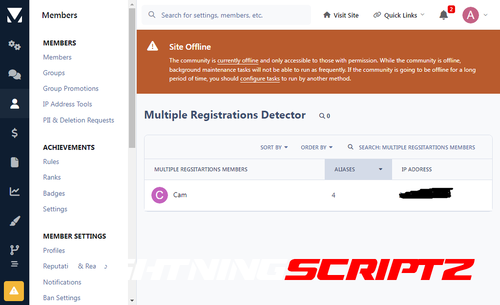
This app scans the database to detect members who have multiple accounts at your forum, and it will list the results. You can also auto ban new multiple registrations of members who have previously registered an account and/or accounts at your forum. The auto banning is done on basis of ip addresses and devices. You can also exclude ip addresses and devices from being auto banned when registering multiple accounts.
Detection Method:
The detection method is being done in 4 ways.
1) Registration Method:
This method is based on scanning the members table for members who have registered more than one account at your forum from the same ip. The ip address in question will be displayed with the latest multiple account. When the ip address is clicked upon, it will display all the other aliases of that member.
2) Posting Method:
This method is based on scanning the posts table for members who have posted from more than one account at your forum from the same ip. The ip address in question will be displayed with the latest multiple account. When the ip address is clicked upon, it will display all the other aliases of that member as well as the posts and topics that they have posted.
3) Ip Login Method:
This method is based on scanning members known ip addresses, i.e. their last used ips, during the login and if a member has logged in to different accounts from the same ip, the action will be logged and displayed.
4) Device Detection Method:
This is the most accurate method imo. Ipb adds a unique cookie to members devices when they log in to the forum. The cookie expiration date is set to one year and its unique string is associated with the users device and stored in the device table. This means if someone logs in to your forum, logs out and then logs in using another account and a different ip address, then it can tell that it was the same person. It means that person has to use same machine, same browser irrespective of the ip address he/she is using.
Search:
All 4 multiple accounts detection methods have a quick search option where you can search the results based on members names.
Auto Banning:
All users who will try to register multiple accounts using the same ip address or device can be banned automatically upon registrations. Admins can exclude ip address(es) and device(s) from being banned.
Compatibility:
This app is compatible with Ipb 5 only. If you are using the Ipb 4.7. version of the app you will have to uninstall it first. Then you can install this one. No data will be lost as the app doesn't add a table of its own to the database, but queries the relevant Ipb tables.
- 1 Downloads
-
UStatus is an application that allows members to post status updates on their profile pages, serving as an alternative to the old Status Updates feature in v4. It is easy to set up and features an intuitive user interface for a seamless experience.
Main Features:
Post status updates on profile pages.
Comment on others' status updates.
Give reactions to status updates.
Allow posting status updates on other members' profile pages.
Notifications for new comments, new status updates, reactions.
A widget to display all members' status updates.
Ability to import old data from v4 Status Updates.
Support the Friends application with the permission "Who can post on your profile: everyone, friends only, nobody"
Demo:
https://demo.ipsappzone.com/profile/1-admin/?&tab=node_ustatus_Ustatus
- 1 Downloads
-
This app allows using Widget to display the statistic in your site. Members could see and update the newest information on that.
Features:
DISPLAY STATS IN TAB VIEW
DISPLAY STATS IN GRID VIEW
Manage stats in widget's settings:
Easy to add/delete stats.
Drag & drop to reorder the position quickly.
Clicking on stats to options: title, categories, thumbnails.
Supports IPS official apps: Forums, Downloads, Pages, Nexus, Gallery, Calendar. And 3rd party apps that meets the requirement for IPS4 Content, such as: Videobox, Musicbox, Tutorials, etc.... with the following stats:
New content
New comments
New reviews
Most viewed
Hot Topics
New Members
Top Reputations
.....
Other:
Auto-update stats every X seconds.
Widget title.
Thumbnail style (square or round).
Fully support AJAX.
Fully support responsive design.
- 23 Downloads
-
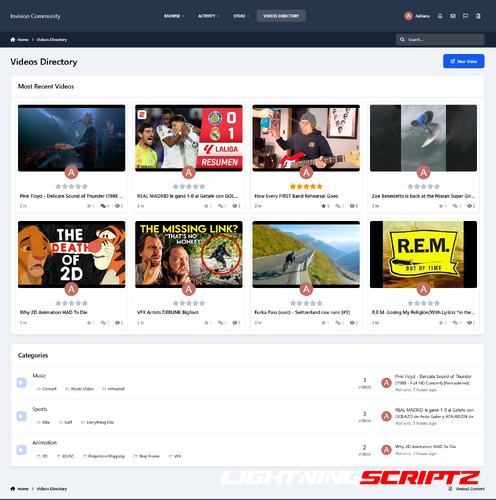
This application will allow users to create records from their preferred videos on YouTube (including regular and short videos), Vimeo, and Dailymotion, or even upload videos. The application automatically retrieves video thumbnails, so all you need to do is enter the video title, paste the URL, and optionally add a description—that's it.
Key features of this application include:
Integrated with YouTube Data API to grab data from videos via search to add them quickly.
Two options to choose how the index will look like: Blocks or Tabs.
Unlimited categories with support for unlimited parent-child relationships.
Customizable category icons.
Flexible options to enable a comments and reviews system per category.
Ability to add polls to videos.
Extra Fields group that can be used per category.
Additional Videos: videos added within a video.
Profile tab displays the videos submitted by the profile owner.
Thumbail management.
Several places to display advertisements.
Other features:
Integrated with the framework, including features such as search, tags, follow functionality, reactions, and more.
Integration to RSS/Atom Feed Imports.
Support for Rest API
Support for Webhooks
Settings:
Settings to control the application behavior in several places/situations.
Note:
This version does not include a converter for the old Videos application by Mike J. It will be reworked and added in a future update.
- 1 Downloads
-
Note: Thumbnails are not supported in search results and activity streams like in v4 due to the absence of hook points.
Features:
Display topic thumbnails in:
Forum index (feed mode not supported).
Forum view.
Tags view.
Topic Feed widget.
IPS Featured Content.
Clubs.
Support for additional apps: Quick Search, Featured Content Pro, Pro Stats
Allow topic authors or specified member groups to select thumbnails from:
Images within the topic content,
External URLs
Manual uploads.
Ability to generate thumbnails from YouTube, Vimeo, Dailymotion.
Support for Grid View mode.
Option to replace Forum Icons with Topic Thumbnails.
- 0 Downloads
-
Slider Maker is an application that allows you to create professional sliders, responsive layout and touch support for mobile devices. You can manually build your sliders by adding images, videos, content, animated layers. Or adding slides automatically from Clubs, Forums, Downloads, Calendar, Gallery, Pages, Videobox.
It’s focused on performance, stability, accessibility to providing the best experience for user experience in mind. Providing a clean and intuitive user interface in ACP and a smooth experience for the end-users.
Back-end features:
Create and manage sliders with a clean and intuitive user interface in ACP.
Customize the slides with different layers: Heading, Content, Image, Video (Youtube & Vimeo).
Sort slides and layers with a simple drag and drop.
Easy remove or duplicate a slide.
Auto builds a slider from content items (supports Clubs, Forums, Pages, Downloads, Gallery, Blog, Calendars, Nexus Products, Videobox, Tutorials).
Auto generates random CSS backgrounds for content items that have no images.
Export and import allow you to create backups or move sliders between installations.
Preview all your changes directly in the ACP.
Breakpoints to change the configuration of the slider depending on screen size.
Permission to view sliders.
Front-end features:
Fully Responsive
Touch swipe
Transition effects: Fade & Slide
Carousel layout
Animated and static layers
Full Width and Full Window
Full screen
Auto Height
Infinite scrolling
Keyboard navigation
Thumbnails
Lazy loading
Video support (Youtube and Vimeo).
Different sized images
JavaScript breakpoints
Display slider in IPS widget (top, bottom, sidebar), or using slider's code to templates to display it everywhere.
Viewing content in a popup (supports Downloads, Forums, Pages, Calendars, Videobox)
Examples:
https://demo.ipsappzone.com/slidermaker/example1.html/ (Gallery with animated layers and thumbnails)
https://demo.ipsappzone.com/slidermaker/example2.html/ (Slider with animated layers)
https://demo.ipsappzone.com/slidermaker/example3.html/ (Carousel)
- 1 Downloads
-
Topic Utilities is a powerful application designed to streamline forum discussions with automation and moderation tools. Whether you're managing an active community or optimizing engagement, this app provides essential features to keep discussions organized and efficient.
Key Features:
✅ Auto Welcome - Automatically creates a welcome topic when a new member registers, helping foster engagement.
✅ Auto Reply - Automatically respond to new topics with a predefined message, perfect for support forums to confirm message receipt.
✅ Restrict Consecutive Posts - Prevent users from posting multiple consecutive replies. A user must wait for another member to reply before they can post again in the same topic, reducing spam and encouraging balanced discussions.
✅ Topic Rules - Define and display custom rules for specific topics, ensuring users understand and follow guidelines before participating.
✅ Auto Pin - Automatically pin a topic when it reaches a predefined number of replies, keeping important discussions visible.
✅ Auto Lock - Automatically lock a topic when it reaches a set number of replies. Useful for limiting discussions in announcements, event promotions, job postings, or special offers to avoid irrelevant comments.
✅ Change Author - Change the author of a topic to another user, useful for content management or ownership transfers.
✅ Edit title silently - Edit topic title without adding logs or history.
- 4 Downloads
-
- 1 Downloads
-
Advanced Messenger enhances private messaging with powerful features:
Reactions – Send reactions in private conversations, making interactions more engaging and expressive.
Signature – Allow users to showcase their personal signature in private messages, adding a personalized touch to conversations.
Auto-Reply Messages – Allows users to configure an auto-reply message which is sent as an automatic response to incoming conversations.
Restrict Consecutive Messages – Prevent users from sending multiple messages in a row without receiving a reply.
Message Notes – Allows users to attach notes to messages, visible to all participants in the conversation. This feature helps highlight important information, reminders, or additional context within discussions.
Upgrade your messaging experience with better engagement and control
- 7 Downloads
-
StopForumSpam
- application to prevent spammers from registering on the forum.
When registering a new user, the application checks the email, IP address and/or username, and if this data is in the spam database of the service https://www.stopforumspam.com/ - it bans the account.
- 5 Downloads
-
This application will display language flags or a dropdown menu at the top of the board, allowing users to switch between languages more quickly and easily.
Setting:
Display:
Country flags
Languages Dropdown
- 1 Downloads
-
This app helps users connect and build friendships with others in an easy and engaging way.
Features:
Friend Requests:
Users can send friend requests to connect with others.
Notifications:
Get notified when:
You receive a new friend request.
Your friend request has been accepted.
Users can manage notification preferences, choosing to enable/disable them or receive alerts via email or inline notifications.
Friend Display:
A Friends icon on the top navigation bar appears on every page.
A Friends tab is available on the profile page.
One-click access to send private messages (PM) or chat (requires Chatbox+).
Quick friend search for easy access to connections.
Privacy Settings:
Users have control over their privacy, with options to set:
Who can view their profile.
Who can send them private messages.
Who can see their friends list on their profile.
Support the uStatus application with the permission: Who can post on your profile.
Suggested Friends Widget:
A widget displays random users you may know, available in slider or grid view for easy browsing.
Mutual Friends Display:
Mutual friends are shown on the profile page and in the suggested friends widget, making it easy to find common connections.
- 2 Downloads
-
- 0 Downloads
-
This application will give faster access to all files purchased by a specific member, by visiting their profile. The profile tab will appear only to administrators.
Currently, you can only get this list if you access their ACP profile -> Customer's tab.
- 0 Downloads
-
Description:
This app scans the database to detect members who have rmultiple accounts at your forum, and it will list the results.
Detection Method:
The detection method is being done in 4 ways.
1) Registration Method:
This method is based on scanning the members table for members who have registered more than one account at your forum from the same ip. The ip address in question will be displayed with the latest multiple account. When the ip address is clicked upon, it will display all the other aliases of that member.
2) Posting Method:
This method is based on scanning the posts table for members who have posted from more than one account at your forum from the same ip. The ip address in question will be displayed with the latest multiple account. When the ip address is clicked upon, it will display all the other aliases of that member as well as the posts and topics that they have posted.
3) Ip Login Method:
This method is based on scanning members known ip addresses, i.e. their last used ips, during the login and if a member has logged in to different accounts from the same ip, the action will be logged and displayed.
4) Device Detection Method:
This is the most accurate method imo. Ipb adds a unique cookie to members devices when they log in to the forum. The cookie exparation date is set to one year and its unique string is associated with the users device and stored in the device table. This means if someone logs in to your forum, logs out and then logs in using another account and a different ip address, then it can tell that it was the same person. It means that person has to use same machine, same browser irrespective of the ip address he/she is using.
Search:
All 4 multiple accounts detection methods have a quick search option where you can search the resuts based on members names.
Compatibility:
This app is compatible with Ipb 5 only. If you are using the Ipb 4.7. version of the app you will have to uninstall it first. Then you can install this one. No data will be lost as the app doesn't add a table of its own to the dataabse, but queries the relevant Ipb tables.
- 5 Downloads
-
Youtube Importer is an application allows you to import Youtube videos manually or automatically.
Features:
Import videos to Forums.
Import videos to Pages.
Import videos to Videobox.
Supports Youtube feed: User, Channel, Playlist, Search Term
Creating tasks to import videos automatically.
Running task manually to import latest 10 videos or all videos.
- 1 Downloads
-
Who was online
- widget that adds statistics of users who have been online for the last X hours.
- 0 Downloads
-
TMDB EasyPost – Create Movie & TV Show Topics Instantly from TMDB!
TMDB EasyPost is the ultimate tool for creating captivating topics about movies and TV shows from TheMovieDB (TMDB) with just a URL or by searching by title! Perfect for movie communities, review websites, and entertainment forums, this app simplifies content creation, helping you engage your audience with rich, detailed posts.
✨ Key Features:
🚀 Instant Post Creation: Generate fully detailed posts from TMDB URLs or by searching TV shows and movies by title in seconds.
🌍 Multi-Language Support: Import movie details in any ISO-639-1 language supported by TMDB
🎯 Multi-App Integration: Seamlessly publish to Forums, Pages, Downloads, and Videobox.
📊 Rich Content: Automatically includes poster, trailers, cast, crew, genres, backdrops and more.
With TMDB EasyPost, creating professional-looking movie and TV show topics has never been easier. Delight your audience and grow your community effortlessly! 🎬🌟
🫱Demo:
https://demo.ipsappzone.com/topic/1203-alarum-2025
https://demo.ipsappzone.com/video/view/525-gladiator-ii-2024/
- 2 Downloads
-
This application will allow your members to upload music tracks to play on their profiles with a nice tidy custom audio player
Features
Adds a custom java-script / jQuery / Ajax music players to user's profiles
Allow your members to upload multiple music tracks to their profiles
Adds a playlist with all their uploaded music allowing to switch tracks easily
Easily edit the track names by clicking and holding the track name in the playlist without having to reload the page
Easily re-position the tracks by dragging them and dropping them into your chosen positions
The audio player has 5 buttons
Repeat ( this will repeat the playing track )
Next ( skip to the next track )
Previous ( go to the last track )
Volume ( Toggles volume bar )
This will show a volume bar that you can drag with 2 more buttons allowing you to turn it up or down
Play / Pause ( Does what it says on the tin )
Easily delete each track without having to reload the page ( this will show a pop-up asking to confirm the deletion )
Members can customize their audio player's button/volume/progress bar from a choice of 8 colors that are either solid or with a shadow
Set auto play function so members' tracks will auto-play when the page loads
Allow members to add other members' tracks to their playlists
This will not duplicate or copy any audio files it will just add the ability for the track to be played on other members' playlists
Tracks added to playlists via sharing will not count towards the user's uploads count as they are not uploading a new track
Members can toggle the ability for other members to add their tracks to their playlists easily via the audio player
When a member grants permission for their tracks to be shared a new add to my playlist icon will appear next to their track names
If a member adds another member's track to their playlist and the uploader decides to delete their track, the track will also be removed from all playlists it has been added to
Admin Member Group Settings ( These are set per group )
Can upload audio tracks
Select the maximum upload size per track
Select the maximum upload limit per batch of uploads
Select the number of total tracks the member can upload altogether
- 3 Downloads
-
This application allows you to showcase testimonials on your site.
Demo: http://demo.ipsappzone.com/testimonials/
Main Features:
Engaging Testimonial Sliders in widget: Choose from 3 sleek slider styles to display testimonials beautifully.
Flexible Sorting: by newest, oldest, or randomize.
Responsive Design: Looks great on desktops, tablets, and mobile devices for a seamless experience.
Category Support: Organize testimonials into relevant categories to help users find what they need.
Permission Control: Set permissions for viewing, submitting, and managing testimonials.
Approval Options: Enable moderation so testimonials can be approved by moderators.
Customizable Fields: Toggle titles, ratings, and additional info like company, job, and website.
Complete Management: Easily edit, show/hide, or delete testimonials as needed.
RSS Feeds: Provide up-to-date testimonials via RSS.
- 1 Downloads
-
Tired of boring messages spread across your site? then liven it up by downloading Sticky Notes, this application will allow you, or if you have selected members, To post global Sticky Notes to other members on your board, Users can easily dismiss each Sticky Note and then can even drag and drop them around their screen
Global Sticky Notes ( ACP )
Create and display unlimited global Sticky Notes to your members
Choose what user groups can see each Sticky Note
Add a signature ( username and avatar ) to the bottom of each Sticky Note allowing members to see who wrote it, as a clickable link to said profile
Choose the colour of each Sticky Note
Choose from 9 different positions to show each Sticky Note
Set an expiry time and date for each Sticky Note with an option to show it until the user dismisses it
Select where to show each Sticky Note from a list of your installed applications or just to show it everywhere (For example only show the Sticky Note when users are browsing the forums or the downloads section etc )
Use a wide range of tags to engage your members more personally
Global Sticky Notes Front End Admin
The admin/s can create new global Sticky Notes from the front end via the create menu ( Only admins can use this feature )
Personal Sticky Notes ( MEMBERS )
Allow chosen user groups to send personal Sticky Notes to other members
Members can receive an unlimited amount of Sticky Notes
All Sticky Notes are dismissable
All personal Sticky Notes will automatically add the username and avatar unless you have selected in the ACP to allow anonymous Sticky Notes (read ACP Menu below)
Personal Sticky Notes will display the time the note was sent to the member for example "just now", " 5 minutes ago", "4 hours ago", "16th July" and so on
Members can either send Personal Sticky notes to members by their hovercard or via their forums topics and you can also send them via the users create menu
Each (Nonanonymous) personal Sticky Note has a reply icon allowing users to reply to other members' notes easily
Front End ( PERSONAL STICKY NOTES )
Added a link to the user drop-down menu linking to the new tables listed below
Shows a table listing all the members who received Sticky Notes with the ability to restore the note bringing it back to life
Shows a table listing all the members who sent Sticky Notes with the ability to edit and resend or just resend the Sticky Note, it also shows if the user has dismissed the Sticky Note
Members can view all their sent and received Sticky Notes between them and X member
All tables can be sorted by time and date and also have an advanced search for members or a time and date stamp
Widgets
Show a widget with a list of members who have sent the most Sticky notes
Show a widget with a list of members who have received the most Sticky Notes
ACP Menu
Sticky Notes (Global including personal)
Choose to use either a pin or a bit of sticky tape to hold the Sticky Note
Choose to show or hide Sticky Notes on mobile or tablet devices
Change the z-index of the Sticky Notes ( This is only needed for some custom themes you might have installed )
Allow users to drag and drop the Sticky Notes around their screen by hovering over the pin and dragging the Sticky Note
Personal Sticky Notes
Allow members to send anonymous Sticky Notes to other members (admin can view all Sticky Notes in the ACP read below)
Read all the Sticky Notes sent by members in a nice and tidy table and you (being the admin) can even view the sender if they sent it anonymous
Select what member groups can use personal Sticky Notes
Choose from 9 different positions to place the Sticky Notes
Mass delete Sticky Notes by either "ALL", "READ", or "UNREAD", by individual members or by chosen user groups
Choose the colour of personal Sticky Notes
Member Group ACP
Choose how many personal Sticky Notes each member group can send per day, with an unlimited option
Members Restrictions ACP
Block individual members from using personal Sticky Notes
Block individual members from receiving Sticky Notes
- 1 Downloads
-
Member mention - application allows you to add a button to mention a user in his message.
App settings
To set up the application, go to Theme editor > Content > Body > Mention.
Here you can choose four button locations:
Author pane (next to the name).
Post controls.
Post user stats
Post user info
- 1 Downloads
-
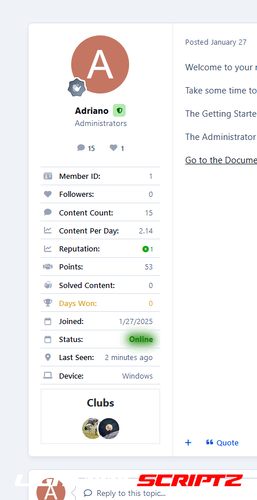
Enhance your user info panel with this powerful, fully customizable application for forum topic posts. You do not need to show all the information; you can choose to show or hide any one of them or just hide them for mobile viewing. You can also choose what user groups can see each piece of information.
User Info Panel
Edit the width of the user info panel between 200px and 350px
Profile Info
Show/Hide the user ID
Show/Hide the user group with color formatting
Personal Info
Show/Hide the user's birthday
Change the birthday view to show the member's age instead
Show/Hide the user joined date
Change the joined date to one saying "With Us For X Days"
Show/Hide the user's online status
Show/Hide the user's last activity
Show/Hide the users timezone
Show/Hide the user's follower count
Show/Hide the user's connected device
Content
Show/Hide the user post count
Show/Hide the user's post-per-day ratio
Show/Hide the user's reputation
Show/Hide the user's amount of leader board members of the day won
Show/Hide the Achievements
Choose to use a gold font for the member of the day
Show/Hide the user's solved content
Clubs
Show/Hide the user's clubs as icons at the bottom of the user info panel (The club name will appear on hover)
Change the size of the club's icons
Requirements:
Forums application
Notes:
This version doesn’t show the Number of Topics created and the topics-per-day ratio; it may return in a future version.
This version doesn’t show the secondary group’s names or images; it may return in a future version.
This version doesn’t show profile fields as it is already displayed on userInfoPanel and we can only add new stuff on IPS5; we can’t hide/remove existing stuff so it would show twice.
- 9 Downloads