






Shades of Grey
A simple dark theme for XenForo 2
No template edits ... only CSS additions
The style has been exported as an "archive" so no need to "extract" the zip file
Simply import the .zip file as is
Installation Instructions: While in the Admin CP, select:
Appearance > Styles > Import > Child of style: (No Parent) > and then click "Import"
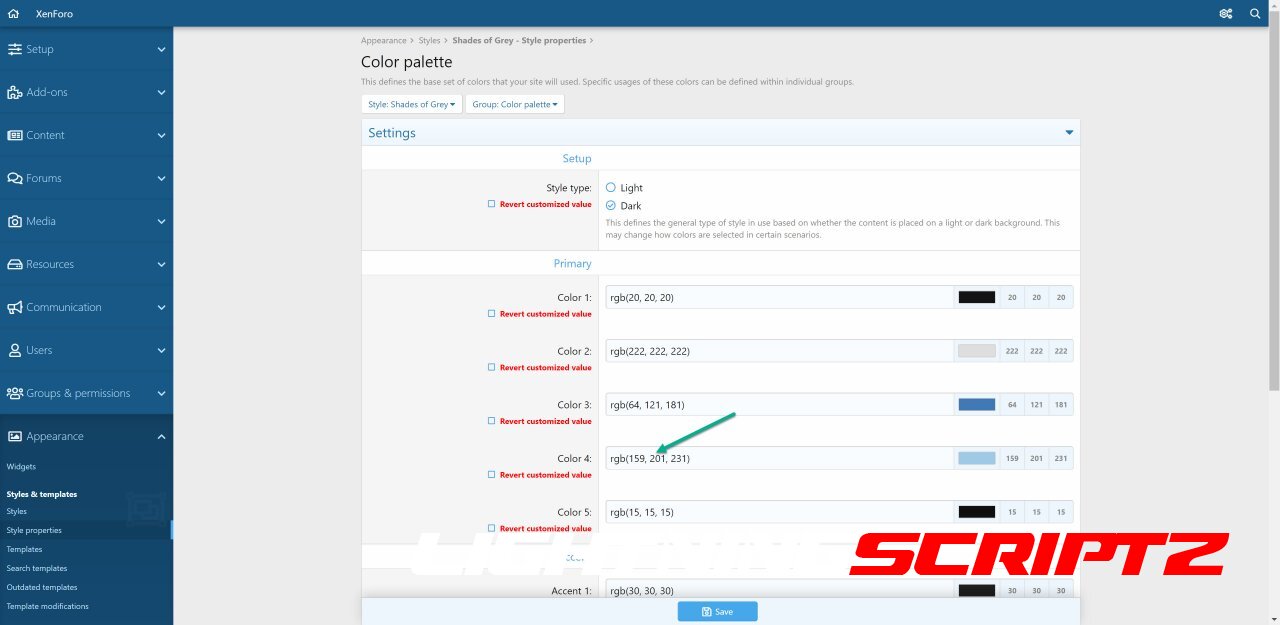
NOTE: If you would like to change the text accent color, simply go to:
Admin CP > Appearance > Style Properties > Shades of Grey > Color Palette > Color 4
For example, a cream-colored accent would use " rgb(226, 226, 188).
If you liked the old (and discontinued) "Cream Accent" style, make these three simple changes:
Color 3: rgb(54, 100, 132) to rgb(54, 108, 54)
Color 4: rgb(112, 171, 203) to rgb(226, 226, 188)
Accent 2: rgb(163, 102, 41) to rgb(107, 173, 109)
You may only provide a review once you have downloaded the file.
There are no reviews to display.