2.2 Themes
12 files
-
Titan is the ultimate gaming theme, based upon a large wallpaper image which is blurred behind textured navigation and category bars. Assign up to 6 background images via the theme settings to completely change the colour scheme, and let your members choose their favourite from a predefined selection!
- 2 Downloads
-
ClanZ style is mostly for gaming communities but with some small edits it can fit every need!
You can:
set background for node set icons for each forum set big content display panel with highlights set logo set welcome message set announcement set custom footer with 4 blocks set 2 or 3 forum nodes in one row Other features:
responsive design support for font awesome icons support for SVG icons support for sprite icons fast installation unique avatar styling great border hover effects Check the demo now:
- 3 Downloads
-
Ready for a gamer theme? If you are, then look at this beautiful and clean theme called “Pad” , Pad is packed with great features and admin options
The styling options are also top notch, with lots of color pickers in the admin area that will help you customize the look and feel of your community in detail. In the same time, we haven’t forgot about font variations (Google Fonts is integrated with this theme)
- 1 Downloads
-
More UI. X Features:
Standard, floating, or sticky navigation and userbar
Right to left support
Dozens of different search bar and navigation position variations
Collapsible nodes, sidebar, postbit, and signatures
Many types of category description types (tooltip, inline, or none at all)
Social Media icons can easily be moved down to the footer or to the logo block
Different login styles such as modal window, dropdown, and slideout
Option to enable avatars based on Material Design's color system
Option to remove the forum list page actions (New Posts and Post New Thread buttons)
- 1 Downloads
-
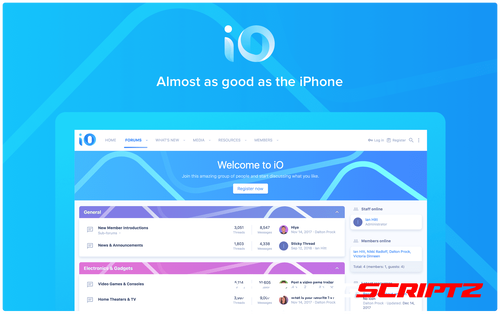
iO
This vibrant, minimalist theme with concepts from Apple’s Human Interface Guidelines creates a professional forum that stands out. Your forum and discussions will flow with the clean and subtle design. Make iO unique with category strips that automatically change color based on your primary brand color.
Built with the UI.X 2 framework
Clean typography
Uses material line icons
Full page animations on page load
Uses a tab bar at the bottom of the screen on mobile devices
Full height iOS-style modals
Category strips that automatically change color based on your primary brand color
- 0 Downloads
-
This is a free product with any purchase of UI.X 2 for XenForo 2 with an active license. Use coupon code ClassicDarkFreeUIX2 if you have UI.X 2 and ClassicDarkFreeUIX2Dark if you have UI.X 2 Dark. See UI.X 2 for coupons as well if coming from XenForo 1.
More UI.X Classic Dark Features:
Standard, floating, or sticky navigation and userbar
Right to left support
Dozens of different search bar and navigation position variations
Collapsible nodes, sidebar, postbit, and signatures
Many types of category description types (tooltip, inline, or none at all)
Social Media icons can easily be moved down to the footer or to the logo block
Different login styles such as modal window, dropdown, and slideout
Option to enable avatars based on Material Design's color system
Option to remove the forum list page actions (New Posts and Post New Thread buttons)
- 0 Downloads
-
Based off it’s XenForo 1 successor, Abyss still brings many of the same features to XenForo 2.
Features include a flat, modern design with a hand-crafted and detailed interface design which is integrated with UI.X 2.
Abyss brings it’s darker look which suitable for any forum along with many different abilities that allow you to switch out the background image, a node grid management system, and so much more which was offered in it’s XenForo 1 version.
Abyss Features
[TH] Nodes Included, More Coming Soon!
When purchasing Abyss, you get a free [TH] Nodes license. It is automatically created after you checkout. You can learn more about [TH] Nodes here.
More Abyss Features:
Standard, floating, or sticky navigation and userbar
Flat modern design
Dozens of different search bar and navigation position variations
Collapsible nodes, sidebar, postbit, and signatures
Many types of category description types (tooltip, inline, or none at all)
Different login styles such as modal window, dropdown, and slideout
Option to remove the forum list page actions (New Posts and Post New Thread buttons)
Option to enable avatars based on Material Design's color system
Switch out the background image, node grid management, and so much more!
- 0 Downloads
-
Hello, I wanted to share with you the design I made for Xenforo.
added to the theme
wt-gust-box (User Notification area is set from admin panel)
wt-foter (foter information area is set from admin panel)
etc...
I made the nevbar field a single line etc. I stayed true to the original as much as I could, in short, I tried to make something simple and elegant.
Compatible XF Versions 2.2
- 2 Downloads
-
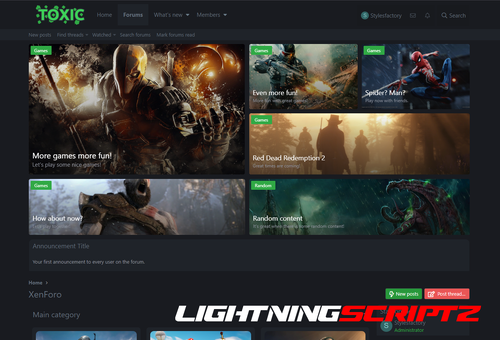
Toxic style is for people who want to try something more then just a dark theme. It can be used for all kind of communities.
You can:
set background for node
set icons for each forum
set big content display panel with highlights
set logo
set welcome message
set announcement
set custom footer with 4 blocks
set 2 or 3 forum nodes in one row
Other features:
collapse categories
responsive design
support for font awesome icons
support for SVG icons
support for sprite icons
fast installation
For the style to work correctly, you need to set this:
[SF] Core 1.0
- 3 Downloads
-
It has exciting features and excellent code quality.It has been designed and developed after thorough research to cater the requirements of people who interested in building user based directories. The design is contemporary but at the same time it focuses on the usability, visual hierarchy and aesthetics to ensure easy navigation for the end users.
With Ryzer Pro, you will have both light and dark versions. In this way, you get two themes for a single theme price.
It also comes with the threads ticker add-on and user reaction structure in the sidebar that comes with the theme.
Ryzer Pro – Premium XenForo theme with perfect responsive design and a lot of customization options available without any coding knowledge. Customize theme colors, add items to your menus, sidebar, change overall layout just with few clicks! Retina ready with support for every resolution.
RYZER PRO STYLE PROPERTIES
Main Features of Ryzer Pro:
Fully Responsive Layout
Threads Ticker
Sidebar user reactions
7 different color options
Links hover effect
Button hover effect
Navigation links hover effect
Three User Bar Layout
Font-awsome navigation icons
Font-awsome visitor menu icons
Font-awsome sidebar icons
Font-awsome notable member page icons
Font-awsome account page sidenav icons
Remove Sub-navigation row
Show/Hide Breadcrumbs
Hide Forum Title in Index Page
Collapsible Categories
Sidebar Position
Sticky Sidebar
Collapsible Sidebar and Blocks
Two Different forum Layout
Category statistics
Switchable node icons
Sticky and Normal Threads
Posting Icons
Advanced footer easily customized
Modern Cross Browser Support
And more...
- 2 Downloads
-
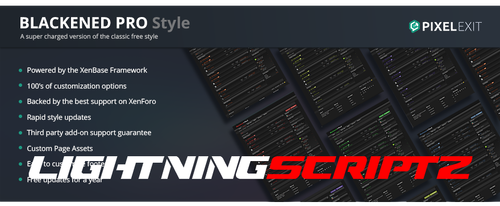
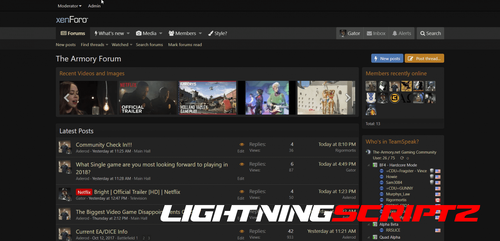
Blackened Pro is the Pro version of our free style Blackened. The Pro version has been enhanced and comes with the variety of options that are available in our XenBase style framework. 4 Different message layouts, 3 different node layouts are among the many other popular options that are ready for you to activate with the check of a box.
Blackened makes the perfect gaming style or if you are wanting to offer your users a dark style. Fully detailed throughout providing a consistent look and feel.
Special note: The XF1 version differs slightly from the XF2 version. Please see both demos and ask any questions you may have.
Compatible XF Versions 2.2
- 5 Downloads
-
Shades of Grey
A simple dark theme for XenForo 2
No template edits ... only CSS additions
The style has been exported as an "archive" so no need to "extract" the zip file
Simply import the .zip file as is
Installation Instructions: While in the Admin CP, select:
Appearance > Styles > Import > Child of style: (No Parent) > and then click "Import"
NOTE: If you would like to change the text accent color, simply go to:
Admin CP > Appearance > Style Properties > Shades of Grey > Color Palette > Color 4
For example, a cream-colored accent would use " rgb(226, 226, 188).
If you liked the old (and discontinued) "Cream Accent" style, make these three simple changes:
Color 3: rgb(54, 100, 132) to rgb(54, 108, 54)
Color 4: rgb(112, 171, 203) to rgb(226, 226, 188)
Accent 2: rgb(163, 102, 41) to rgb(107, 173, 109)
- 2 Downloads