
Birdman
Super Moderator
-
Joined
-
Last visited
Files posted by Birdman
-
Nice little widget that shows the members who have visited the forum in the last X hours.
Features:
- Number of hours adjustable
- Select which groups can see the widget
- Display "Most members online"
- Set the number of members to display
- Groups that should not be listed can be selected
- Members can be selected by their last visit, group or name for sorting. You can also choose in the settings whether names or avatars (in two sizes) are displayed.
- 0 Downloads
-
This app allows you to create collection from topics and posts and show in TabView and GridView using tons of customization options.
- 0 Downloads
-
This application allows you to showcase testimonials on your site.
Demo: http://demo.ipsappzone.com/testimonials/
Main Features:
Display testimonials friendly on sliders. There are 3 slider's styles.
Option to sort descending/ascending or random.
Responsive layout (desktops, tablets, mobile devices).
Support caterories.
Enable/Disable Title on testimonial.
Enable/Disable Rating on testimonial.
Enable/Disable testimonial must be approved by moderators.
Enable/Disalbe other informations: Company, Job, Website.
Permissions to View, Submit and Manage.
Fully manageable (edit, show/hide, delete).
RSS for latest testimonials
- 0 Downloads
-
This application will allow users from specific user groups to add notes to members, in order to have better control of the member's life in the community
Adding Notes: Users from specific groups can add notes in two places:
+ Create menu
Directly on user Profile, on a new tab called Notes, where notes can be edited or deleted, if you have permission to do it.
Directly on member's posts
Features:
New tab called Member Notes on ModeratorCP -> Member Management to display notes from all members, where notes can be edited or deleted, if you have permission to do it.
Number of notes on user's posts, linked to the tab in his profile. You can also add a note from the post.
Number of notes on user's personal card (mini profile on hover user link)
Widget to display the latest notes.
Notification to all users who can view notes when someone gets a new note.
Ability to send a private message to the member with the note content.
Group permissions:
Can view notes
Can add notes
Can edit notes
Can delete notes
Settings:
Show the PM option on Member Notes form
- 0 Downloads
-
TMDB EasyPost – Create Movie & TV Show Topics Instantly from TMDB!
TMDB EasyPost is the ultimate tool for creating captivating topics about movies and TV shows from TheMovieDB (TMDB) with just a URL or by searching by title! Perfect for movie communities, review websites, and entertainment forums, this app simplifies content creation, helping you engage your audience with rich, detailed posts.
✨ Key Features:
🚀 Instant Post Creation: Generate fully detailed posts from TMDB URLs or by searching TV shows and movies by title in seconds.
🌍 Multi-Language Support: Import movie details in any ISO-639-1 language supported by TMDB
🎯 Multi-App Integration: Seamlessly publish to Forums, Pages, Downloads, and Videobox.
📊 Rich Content: Automatically includes poster, trailers, cast, crew, genres, backdrops and more.
With TMDB EasyPost, creating professional-looking movie and TV show topics has never been easier. Delight your audience and grow your community effortlessly! 🎬🌟
🫱Demo:
https://demo.ipsappzone.com/topic/1203-alarum-2025
https://demo.ipsappzone.com/video/view/525-gladiator-ii-2024/
- 2 Downloads
-
This application allows you to showcase testimonials on your site.
Demo: http://demo.ipsappzone.com/testimonials/
Main Features:
Engaging Testimonial Sliders in widget: Choose from 3 sleek slider styles to display testimonials beautifully.
Flexible Sorting: by newest, oldest, or randomize.
Responsive Design: Looks great on desktops, tablets, and mobile devices for a seamless experience.
Category Support: Organize testimonials into relevant categories to help users find what they need.
Permission Control: Set permissions for viewing, submitting, and managing testimonials.
Approval Options: Enable moderation so testimonials can be approved by moderators.
Customizable Fields: Toggle titles, ratings, and additional info like company, job, and website.
Complete Management: Easily edit, show/hide, or delete testimonials as needed.
RSS Feeds: Provide up-to-date testimonials via RSS.
- 1 Downloads
-
Tired of boring messages spread across your site? then liven it up by downloading Sticky Notes, this application will allow you, or if you have selected members, To post global Sticky Notes to other members on your board, Users can easily dismiss each Sticky Note and then can even drag and drop them around their screen
Global Sticky Notes ( ACP )
Create and display unlimited global Sticky Notes to your members
Choose what user groups can see each Sticky Note
Add a signature ( username and avatar ) to the bottom of each Sticky Note allowing members to see who wrote it, as a clickable link to said profile
Choose the colour of each Sticky Note
Choose from 9 different positions to show each Sticky Note
Set an expiry time and date for each Sticky Note with an option to show it until the user dismisses it
Select where to show each Sticky Note from a list of your installed applications or just to show it everywhere (For example only show the Sticky Note when users are browsing the forums or the downloads section etc )
Use a wide range of tags to engage your members more personally
Global Sticky Notes Front End Admin
The admin/s can create new global Sticky Notes from the front end via the create menu ( Only admins can use this feature )
Personal Sticky Notes ( MEMBERS )
Allow chosen user groups to send personal Sticky Notes to other members
Members can receive an unlimited amount of Sticky Notes
All Sticky Notes are dismissable
All personal Sticky Notes will automatically add the username and avatar unless you have selected in the ACP to allow anonymous Sticky Notes (read ACP Menu below)
Personal Sticky Notes will display the time the note was sent to the member for example "just now", " 5 minutes ago", "4 hours ago", "16th July" and so on
Members can either send Personal Sticky notes to members by their hovercard or via their forums topics and you can also send them via the users create menu
Each (Nonanonymous) personal Sticky Note has a reply icon allowing users to reply to other members' notes easily
Front End ( PERSONAL STICKY NOTES )
Added a link to the user drop-down menu linking to the new tables listed below
Shows a table listing all the members who received Sticky Notes with the ability to restore the note bringing it back to life
Shows a table listing all the members who sent Sticky Notes with the ability to edit and resend or just resend the Sticky Note, it also shows if the user has dismissed the Sticky Note
Members can view all their sent and received Sticky Notes between them and X member
All tables can be sorted by time and date and also have an advanced search for members or a time and date stamp
Widgets
Show a widget with a list of members who have sent the most Sticky notes
Show a widget with a list of members who have received the most Sticky Notes
ACP Menu
Sticky Notes (Global including personal)
Choose to use either a pin or a bit of sticky tape to hold the Sticky Note
Choose to show or hide Sticky Notes on mobile or tablet devices
Change the z-index of the Sticky Notes ( This is only needed for some custom themes you might have installed )
Allow users to drag and drop the Sticky Notes around their screen by hovering over the pin and dragging the Sticky Note
Personal Sticky Notes
Allow members to send anonymous Sticky Notes to other members (admin can view all Sticky Notes in the ACP read below)
Read all the Sticky Notes sent by members in a nice and tidy table and you (being the admin) can even view the sender if they sent it anonymous
Select what member groups can use personal Sticky Notes
Choose from 9 different positions to place the Sticky Notes
Mass delete Sticky Notes by either "ALL", "READ", or "UNREAD", by individual members or by chosen user groups
Choose the colour of personal Sticky Notes
Member Group ACP
Choose how many personal Sticky Notes each member group can send per day, with an unlimited option
Members Restrictions ACP
Block individual members from using personal Sticky Notes
Block individual members from receiving Sticky Notes
- 1 Downloads
-
Member mention - application allows you to add a button to mention a user in his message.
App settings
To set up the application, go to Theme editor > Content > Body > Mention.
Here you can choose four button locations:
Author pane (next to the name).
Post controls.
Post user stats
Post user info
- 1 Downloads
-
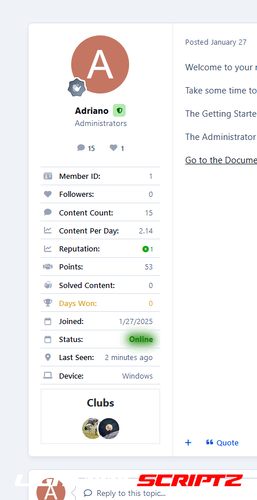
Enhance your user info panel with this powerful, fully customizable application for forum topic posts. You do not need to show all the information; you can choose to show or hide any one of them or just hide them for mobile viewing. You can also choose what user groups can see each piece of information.
User Info Panel
Edit the width of the user info panel between 200px and 350px
Profile Info
Show/Hide the user ID
Show/Hide the user group with color formatting
Personal Info
Show/Hide the user's birthday
Change the birthday view to show the member's age instead
Show/Hide the user joined date
Change the joined date to one saying "With Us For X Days"
Show/Hide the user's online status
Show/Hide the user's last activity
Show/Hide the users timezone
Show/Hide the user's follower count
Show/Hide the user's connected device
Content
Show/Hide the user post count
Show/Hide the user's post-per-day ratio
Show/Hide the user's reputation
Show/Hide the user's amount of leader board members of the day won
Show/Hide the Achievements
Choose to use a gold font for the member of the day
Show/Hide the user's solved content
Clubs
Show/Hide the user's clubs as icons at the bottom of the user info panel (The club name will appear on hover)
Change the size of the club's icons
Requirements:
Forums application
Notes:
This version doesn’t show the Number of Topics created and the topics-per-day ratio; it may return in a future version.
This version doesn’t show the secondary group’s names or images; it may return in a future version.
This version doesn’t show profile fields as it is already displayed on userInfoPanel and we can only add new stuff on IPS5; we can’t hide/remove existing stuff so it would show twice.
- 9 Downloads
-
Tired of boring messages spread across your site? then liven it up by downloading Sticky Notes, this application will allow you, or if you have selected members, To post global Sticky Notes to other members on your board, Users can easily dismiss each Sticky Note and then can even drag and drop them around their screen
Global Sticky Notes ( ACP )
Create and display unlimited global Sticky Notes to your members
Choose what user groups can see each Sticky Note
Add a signature ( username and avatar ) to the bottom of each Sticky Note allowing members to see who wrote it, as a clickable link to said profile
Choose the colour of each Sticky Note
Choose from 9 different positions to show each Sticky Note
Set an expiry time and date for each Sticky Note with an option to just show it until the user dismisses it
Select where to show each Sticky Note from a list of your installed applications or to just show it everywhere (For example only show the Sticky Note when users are browsing the forums or the downloads section etc )
Use a wide range of tags to engage your members more personally
Global Sticky Notes Front End Admin
The admin/s can create new global Sticky Notes from the front end via the create menu ( Only admins can use this feature )
Personal Sticky Notes ( MEMBERS )
Allow chosen user groups to send personal Sticky Notes to other members
Members can receive an unlimited amount of Sticky Notes
All Sticky Notes are dismissable
All personal Sticky Notes will automatically add the username and avatar unless you have selected in the ACP to allow anonymous Sticky Notes (read ACP Menu below)
Personal Sticky Notes will display the time the note was sent to the member for example "just now", " 5 minutes ago", "4 hours ago", "16th July" and so on
Members can either send Personal Sticky notes to members by their hovercard or via their forums topics and you can also send them via the users create menu
Each (Nonanonymous) personal Sticky Note has a reply icon allowing users to easily reply to other members' notes
Front End ( PERSONAL STICKY NOTES )
Added a link to the user drop-down menu linking to the new tables listed below
Shows a table listing all the members who received Sticky Notes with the ability to restore the note bringing it back to life
Shows a table listing all the members who sent Sticky Notes with the ability to edit and resend or just resend the Sticky Note, it also shows if the user has dismissed the Sticky Note
Members can view all their sent and received Sticky Notes between them and X member
All tables can be sorted by time and date and also have an advanced search for members or a time and date stamp
Widgets
Show a widget with a list of members who have sent the most Sticky notes
Show a widget with a list of members who have received the most Sticky Notes
ACP Menu
Sticky Notes (Global including personal)
Choose to use either a pin or a bit of sticky tape to hold the Sticky Note
Choose to show or hide Sticky Notes on mobile or tablet devices
Change the z-index of the Sticky Notes ( This is only needed for some custom themes you might have installed )
Allow users to drag and drop the Sticky Notes around their screen by hovering over the pin and dragging the Sticky Note
Personal Sticky Notes
Allow members to send anonymous Sticky Notes to other members (admin can view all Sticky Notes in the ACP read below)
Read all the Sticky Notes sent by members in a nice and tidy table and you (being the admin) can even view the sender if they sent it anonymous
Select what member groups can use personal Sticky Notes
Choose from 9 different positions to place the Sticky Notes
Mass delete Sticky Notes by either "ALL", "READ", or "UNREAD", by individual members or by chosen user groups
Choose the colour of personal Sticky Notes
Member Group ACP Menu
Choose how many personal Sticky Notes each member group can send per day, with an unlimited option
Members Settings ACP Menu
Block individual members from using personal Sticky Notes
Block individual members from receiving Sticky Notes
How to install
If you have version 1.0.3 or below installed, uninstall it as it's a plugin and will conflict with the new application
Go to your ACP and applications then click to install and upload the downloaded .tar file
- 0 Downloads
-
Slider Maker is an application that allows you to create professional sliders, responsive layout and touch support for mobile devices. You can manually build your sliders by adding images, videos, content, animated layers. Or adding slides automatically from Clubs, Forums, Downloads, Calendar, Gallery, Pages, Videobox.
It’s focused on performance, stability, accessibility to providing the best experience for user experience in mind. Providing a clean and intuitive user interface in ACP and a smooth experience for the end-users.
Back-end features:
Create and manage sliders with a clean and intuitive user interface in ACP.
Customize the slides with different layers: Heading, Content, Image, Video (Youtube & Vimeo).
Sort slides and layers with a simple drag and drop.
Easy remove or duplicate a slide.
Auto builds a slider from content items (supports Clubs, Forums, Pages, Downloads, Gallery, Blog, Calendars, Our Picks, Nexus Products, Videobox, Tutorials).
Auto generates random CSS backgrounds for content items that have no images.
Export and import allow you to create backups or move sliders between installations.
Preview all your changes directly in the ACP.
Breakpoints to change the configuration of the slider depending on screen size.
Permission to view sliders.
Front-end features:
Fully Responsive
Touch swipe
Transition effects: Fade & Slide
Carousel layout
Animated and static layers
Full Width and Full Window
Full screen
Auto Height
Infinite scrolling
Keyboard navigation
Thumbnails
Lazy loading
Video support (Youtube and Vimeo).
Different sized images
JavaScript breakpoints
Display slider in IPS widget (top, bottom, sidebar), or using slider's code to templates to display it everywhere.
NEW Viewing content in a popup (supports Downloads, Forums, Pages, Calendars, Videobox)
Examples:
https://demo.ipsappzone.com/slidermaker/example1.html/ (Gallery with animated layers and thumbnails)
https://demo.ipsappzone.com/slidermaker/example2.html/ (Slider with animated layers)
https://demo.ipsappzone.com/slidermaker/example3.html/ (Carousel)
- 0 Downloads
-
This resource will show a box with the latest topics/posts on board index. The list is automatically updated at every X seconds.
ACP Settings:
Block position: Before of After forums categories
Display topic author photo
Hide the Recent Topics block from mobile devices
Hide the Recent Topics block from small screens devices (tablet, netbook, notebook, etc.)
Number of topics to show
Ability to update member's personal number of topics setting to meet the Admin CP setting
Display Moderator Options: Moderator Options will appear only to those who can moderate content
Show block to specific groups
Display topics from Clubs
Exclude Forums: option to select which forums to NOT pull topics from
Display effect and flash message when the list get updated
Time to automatically update the topics list
Member Setings (Account Settings):
Display Recent Topics
Number of topics to show
Exclude topics from
- 0 Downloads
-
- 0 Downloads
-
This application will allow your members to upload music tracks to play on their profiles with a nice tidy custom audio player
Features
Adds a custom java-script / jquery / Ajax music players to users profiles ( if they have uploaded tracks that is )
Allow your members to upload multiple music tracks to their profiles
Adds a playlist with all their uploaded music allowing to switch tracks easily
Easily edit the track names by clicking and holding the track name in the playlist without having to reload the page
Easily re-position the tracks by dragging them and dropping them into your chosen positions
The audio player has 5 buttons
Repeat ( this will repeat the playing track )
Next ( skip to the next track )
Previous ( go to the last track )
Volume ( Toggles volume bar )
This will show and volume bar that you can drag with 2 more buttons allowing you to turn it up or down
Play / Pause ( Does what it says on the tin )
Easily delete each track without having to reload the page ( this will show a pop-up asking to confirm the deletion )
Members can customize their audio player's button / volume / progress bar from a choice of 8 colors what are either solid or with a shadow
Set auto play function so members' tracks will auto-play when the page loads
Allow members to add other members' tracks to their playlists
This will not duplicate or copy any audio files it will just add the ability for the track to be played on other members' playlists
Tracks added to playlists via sharing will not count towards the user's uploads count as they are not uploading a new track
Members can toggle the ability for other members to add their tracks to their playlists easily via the audio player
When a member grants permission for their tracks to be shared a new add to my playlist icon will appear next to their track names
If a member adds another member's track to their playlist and the uploader decides to delete their track, the track will also be removed from all playlists it has been added to
Admin Member Group Settings ( These are set per group )
Can upload audio tracks
Select the maximum upload size per track
Select the maximum upload limit per batch of uploads
Select the number of total tracks the member can upload altogether
Extensions
Members Shop
Add a item to the member's shop allowing you to charge points for members to upload tracks
This will override all group permissions set except the total uploads per batch so if you only want to allow users to add tracks via shop items then you need to remove their permissions to use it and the item will be the only way they can add tracks
- 1 Downloads
-
This resource will allow members to send notifications to other members.
Groups permissions:
Can send notifications to members
Can send notifications to groups
Content items required to send notifications
Restrict new notifications per hour/day/week or month
Member Restriction:
Can send notifications?
- 2 Downloads
-
This resource uses The Movie Database API to grab data from Movies/TV Shows to your site.
All you have to do is type a word from the movie/TV show title and then a list of matches will show up. From now on, with just a click, you will have the submission form:
Title
Subtitle, if available
Description
Poster
Status
Release Date (for Movies)
Genres
Language
Homepage
IMDB link
Budget
Revenue
Running Time for movies or Episode Time for TV shows
Season (for TV Show)
Number of episodes (for TV Show)
Tabs:
You will also have tabs to display:
Cast (with a link to a popup listing all their data)
Crew (with a link to a popup listing all their data)
Trailers (with videos from Youtube)
Latest Reviews on TMDB
Similar Movies or Similar TV Shows (will list all similar movies/TV shows and again with a click, you can have them in your database)
All the tabs, except Information (the main one with the movie/TV show description), can be disabled via setting.
TMDB API Key:
You can get your free API Key on the TMDB site: https://www.themoviedb.org/settings/api
Multi-Language:
TMDB supports 62 languages. You just have to choose the one in the ACP setting.
Other features:
Fully integrated into the framework: Rest API, categories, extra fields, notifications, search, tags, follow, reactions, promote, etc.
Settings:
Settings to control the app behavior in several places/situations.
- 1 Downloads
-
This application will display the country flag of users in several places of the entire suite, including third-party resources. It uses Geolocation to grab the country when a new user registers an account or when existing users log in on your board. Clicking on the flag will give you a list of all users from that country.
Important Notice:
IPS Geolocation is an active license perk so you need to have an active license to countries get picked by IP Address.
Usage:
New members: new members will have their country detected when they register the account
Existing members: Country will be recognized when a member is online or if allowed by the admin, go to Account Settings and pick your country.
Settings:
Display country flag everywhere: will display the country flag in several places from official apps like on Forums, Gallery, Blogs, Pages, Gallery, Downloads, including its widgets and third-party resources. If disabled, will display the country name + flag only on the user profile.
Groups allowed to change the country: users from selected groups will be able to change their country on Account Settings. Sometimes Geolocation picks the wrong country, so the user will be able to fix it.
- 2 Downloads
-
This plugin allows members to add a gallery to their post.
Main Features:
Enable/disable
Groups can use
Responsive Gallery
Customization: width/height, auto play, thumbnail, transitions, speed, image crop
There is a form in the editor that helps members easy to add image URLs, captions, or select albums (from Gallery app)
Demo: https://demo.ipsappzone.com/topic/1013-gallery-test/
- 4 Downloads
-
EasyPopup is a simple application to create the modal popups for your site.
Some features:
Width/Height for your popup.
Transition open/close: FadeIn/FadeOut, SlideIn, SlideUp, SlideDown, SlideBack.
Transition speed.
Positions: Top Left, Top Center, Top Right, Middle Left, Middle Center, Middle Right, Bottom Left, Bottom Center, Bottom Right
Background color.
HTML content or upload image.
Supports advertisement tag in the HTML code: {advertisement="key"}
Auto close and show timer on popup.
Showing popups every page loads or every X minutes.
Waiting for X milisecond to show.
Easy to determine URL where to show popups.
IPS Member Filter System to show popups. (filter by groups, content count, joined date, last posted, last visited, reputation, member of the day....)
Demo: http://demo.ipsappzone.com/easypopup.html/
- 3 Downloads
-
Community Map is an application that allows users to put their exact or approximate location onto an interactive map. Create unlimited markers and map out the world!
Highlights
Create unlimited marker groups for member meet-ups, exhibits, landmarks, highlights, shops, or other geographic listings. Maps can overlap in a global map.
Administrators can control what member groups are allowed to post to map
Import markers from Google Earth using a .kml or .kmz file
Integrates with Clubs. It shows club members on a dedicated club map, and the club location is shown on the global map.
Integrates with Member's Country where it'll update your member's flags when the map location is added or edited. (In 1.3)
Show Gallery images (as of 1.3), Calendar events, Calendar venues, and Page record addresses on the map
- 3 Downloads
-
This plugin will allow users to set up an automatic reply to personal conversation when they're not available. A new option will be added on Account Settings to users from selected groups. They will be able to enable the auto reply and type the auto reply content. Users with this feature enabled will view a global message warning about the auto reply and will show a link to disable it.
Settings (Admin CP):
Groups allowed to use this feature
Settings (per user on Account Settings):
Enable Auto Reply
Auto reply content
- 4 Downloads
-
Main Features:
Display thumbnails of topics in the main forum view. Topic's authors or member groups that you specify can change thumbnails. They can choose a thumbnail from images in topic content, external URL, or upload from computer.
Ability to generate the thumbnail from Youtube, Vimeo, Dailymotion, and Wistia.
Using Ajax, no need to reload the page after changing the thumbnails.
Support "Gallery View Mode" with big images in a responsive grid. (credits to Masonry)
Widget to display new topics with thumbnails.
Option to replace Forum Icons with Topic Thumbnail.
Thumbnails in search results, activity.
Permissions for viewing and changing thumbnails.
A Toggle Show/Hide for members.
Support IPS Clubs.
Live Demo:
https://demo.ipsappzone.com/forum/3-test-1/ (small thumbnails)
https://demo.ipsappzone.com/forum/4-test-2/ (gridview)
- 4 Downloads
-
Beautiful responsive Sliders or Gridview for IPS
Fully responsive - will adapt to any device.
Flexible customization for sliders: horizontal/vertical random mode, autoplay, speed, duration, button,...
Gridview New
Auto gets contents from IPS applications: Pages, Forums, Gallery, Downloads, Clubs, Commerce
Auto gets contents from Videobox.
Auto gets contents from RSS URL.
Add custom contents manually, easy manage them, drag & drop to sort the contents, click to edit the title, upload image, link,
Auto creates and saves cache for thumbnails.
Support widgets, easy to drag and place them to your site.
Lazyload (IPS 4.4+) New
Viewing content in a popup (supports Forums, Downloads, Pages, Videobox) New
Demo: https://demo.ipsappzone.com/fcontent.html/
- 3 Downloads
-
Enhance your user info panel with this powerful fully customizable application for forum topic posts. You do not need to show all the information; you can choose to show or hide any one of them or just choose to hide them on mobile viewing. You can also choose what user groups can see each piece of information.
User Info Panel
Edit the width of the user info panel between 200px and 350px
Profile Info
Show/Hide the user group with color formatting
Show/Hide secondary group images
Show/Hide the user's clubs as icons (if they are members of one)
Show/Hide the user ID
Content
Show/Hide the user post count
Show/Hide the user's post per day ratio
Show/Hide the user's reputation
Show/Hide the user's amount of leader board members of the day won
Choose to use a gold font for the member of the day
Show/Hide the user topic count
Show/Hide the user's topic per day ratio
Personal Info
Show/Hide the user's birthday
Change the birthday view to the show the member's age instead
Show/Hide the user joined date
Change the joined date to one saying "With Us For X Days"
Show/Hide the user's online status
Show/Hide the user's last activity
Show/Hide the users timezone
Show/Hide the user's follower count
Show/Hide the user's connected device
Clubs
Show/Hide the user's clubs as icons at the bottom of the user info panel (The club name will appear on hover)
Change the size of the club's icons
3rd Party Apps & Plugins
(DF42) Members Social Info
iAwards
Member Away
Trophys & Medals
Members Shop
Other
Show/Hide each section for mobile browsing
Select what user groups can see on the info panel
Display custom profile fields on mobile devices
- 6 Downloads
-
This plugin will give admin the ability to choose a group to move the member when a moderator bans this member via Warn System
- 1 Downloads