
Mercedes-Benz
Retired Staff
-
Joined
-
Last visited
Files posted by Mercedes-Benz
-
The XenForo Media Gallery is an add-on that allows you and your users to create galleries of images, videos, and audio in your forum, organized into admin-defined categories or user-created albums.
Media categories
Media will be placed into individual categories that are organized into a tree. In this regard, they are very similar to the node tree.
A category may be one of three types:
Container only: these categories will not contain media or albums, instead serving to organize sub-categories. Albums only: in these categories, users will create albums that can contain one or more media items. When the category is viewed, there will be one entry for each album. Media items only: media will be added directly to these categories and not organized into albums. Each media item will be displayed directly when viewing the category. If your users are likely to upload a number of related pictures (such as from a single event), you will likely want to use album categories. Note that the category type cannot be changed unless the category is empty.
Media fields
Custom media fields allow you to define additional structured fields for users to fill in when creating a thread. These are similar to custom thread fields.
Media fields can be displayed in one of several locations:
Below media item: this will be displayed in the box below the media, with the title and author info. Bottom of media info block: in the sidebar opposite the comments, in the media information block. Extra info block: in the sidebar opposite the comments, in a new Extra information block. New sidebar block: in its own sidebar block, using the custom field's name as the header. Permissions
The Media Gallery adds a number of new permissions. When installed, reasonable defaults are selected based on existing permissions. However, you should confirm that the permissions meet your needs and that your moderators have the permissions you want.
Options
The Media Gallery's options can be found in the XenForo media gallery option group.
- 0 Downloads
-
The XenForo Resource Manager is an add-on that allows you to manage resources such as files and tutorials or other article-like content along side your normal forum. The aim is allow content such as files to be listed with a focus on the initial content rather than discussion surrounding it. It can be purchased from XenForo.com directly.
- 2 Downloads
-
Polish translation app - [BNS] CJ Duplicate Member Logger
- 0 Downloads
-
Polish translation app - (aXen) Advanced Server List
- 0 Downloads
-
- 0 Downloads
-
- 1 Downloads
-
- 0 Downloads
-
- 0 Downloads
-
- 0 Downloads
-
- 4 Downloads
-
- 6 Downloads
-
Plugin displays users the number of their entries from Chatbox+ application.
- 1 Downloads
-
- 2 Downloads
-
(IPS Plugin) Adds two full-width widget containers (Header and Footer).
- 0 Downloads
-
Converts the current value of hovercard activity to real time along with its last activity.
- 1 Downloads
-
The application updates the Font Awesome version to version 6 without destroying the icons embedded in IPS version 4.
- 5 Downloads
-
- 3 Downloads
-
A number of enhancements for Showcase, affecting the discussion thread display.
When installed, you can browse through all the discussion posts and item updates merged together in chronological order without needing to click off to other pages to get the full story!
Note: You will need to have Showcase option "Display sections 1-6 content on thread" enabled for this to work properly.
Remove first post
The first post is just a post telling you there has been a new item posted, which is just a waste of space, so it's outta there!
Add reactions to main item content
Adds the reaction bar back to the main item content, so users can like it without needing to click "Overview".
Replace "update" posts with the actual update
Now you can see the update inline with the rest of the thread's posts, rather than needing to click a link to go there.
** This doesn't work retro-actively ** A new field discussion_post_id is added to the xf_xa_sc_item_update table - you can go back and fill these in manually if you want.
The div id is maintained so post links will still work.
Reactions are linked directly to the update itself and not the replaced post
Replace "review" posts with the actual review
As above, but this time putting the review inline.
** Cheeky Bonus **
New option in the Showcase options section called "Add Items Directly from Forum Listing". As the name suggests, it adds a new button alongside the current "Post thread" button, allowing you to create an item directly. Just select which forums you want this button to appear in.
I've tested it as best I can, but any issues just let me know
- 0 Downloads
-
Features
Everything is available from within XenForo (you do not need to go to Cloudflare for things) via the Cloudflare API. This allows you give admins permission to do certain things (for example block IP addresses within Cloudflare without giving them access to your Cloudflare account).
It simplifies/automates much of the configuration and usage of Cloudflare with XenForo.
Manage all Cloudflare settings/options for your zone. Ability to purge Cloudflare cache. Cloudflare Firewall support You can automatically create firewall filters to block access to XenForo internal directories that are not intended to be accessed via web browser (internal_data and src). You can also delete any firewall filter. Create/delete Firewall user agent rules. Create/delete Firewall IP address rules. Includes the ability to optionally expire the rule in the future (for example maybe you want to block a class C for 7 days, or you want to force a challenge to a specific IP for 30 days). Manage country-level traffic blocking (includes Tor exit nodes). Ability to force challenge on the registration and contact forms (helps mitigate automated spam). Cloudflare Access support You can automatically create Access policies to allow only admins the ability to access the install and admin.php URLs. You can also delete any existing Access policy. Cloudflare Page Rule support You can automatically create a Page Rule that will instruct Cloudflare to cache XenForo CSS files (normally they are not cached because Cloudflare caches based on file extension, and XenForo's CSS system has .php extension). You can automatically create a Page Rule that will instruct Cloudflare to cache images served through XenForo's image proxy (similar to XenForo's CSS, Cloudflare normally does not cache them because the image proxy uses .php extension). Use Cloudflare Workers as proxy to hide your server's origin IP address for certain XenForo functions: Image proxy Unfurl Supports both Global API key and API tokens. API tokens allow the minimum required permissions and can span multiple zones (you could use the same API token across multiple XenForo installations/domains without giving any unnecessary permissions). Moderators that have the ability to spam clean and view user's IPs get an extra option in the spam cleaner where they can temporarily ban the IP address(es) the spammer used in the last 30 days. The number of days to ban is an option you can set in the admin area (it defaults to 7 days). Ability to backup and restore certain Cloudflare configuration (Access Apps, Firewall Rules, Firewall IP Access Rules, Firewall User Agent Blocking, Page Rules). You can restore backups to a different zone (for example if you had extensive configuration for a zone, you could give another zone the same configuration through a backup restore). Restoring a backup does not delete existing configurations (you are able to merge configuration into an existing config). Cloudflare configuration is protected by a new admin permission, Manage Cloudflare.
In exchange for being free, this addon has a single attribution link buried on the bottom of XenForo's Help -> Cookie usage page (there are no site-wide or footer links).
- 1 Downloads
-
Dice Manager for XenForo 2.2.
If you still have the data from my DiceRoller from XF 1 in your Database, it will be upgrading all the stuff.
What you can do with this AddOn:
Create multiple dice. Not only Numbers, you also can create dice with letters, numbers or - if you enabled the multibyte - add emojis to your die.
Create rules based on checker classes
and finally create a system with will contain one rule and one or more dice, specify if sums should be calculated and when a roll crits.
Added deeply into XenForo with Admin Search, Statistics, Help Page, etc.
See Pictures for more and raise questions if you need more Info.
- 0 Downloads
-
Whitelist for the XF FileCheck
The option fields for entering the data are only visible if debug mode has been activated. (This is only necessary for the input, after which it can be deactivated again.)
- 0 Downloads
-
ChkTable can support you in finding out which tables or fields are no longer used in the XF installation. This is an interesting thing, especially after the change from XF1 to XF2. But even beyond that, it is always of interest to know which add-on has left remnants in the DB.
This version is still at an early stage. The first extensive tests were stable and satisfactory. So we are now looking forward to ideas/opinions.
Features:
Whitelist - Tables Whitelist - Columns
Important Info:
There is a flag for the "config.php" with which you can activate the renaming of a table/column. As with the XF superAdmin flag, the admin user IDs that are to have access to the add-on must be entered here.
$config['X0815']['ChkTables']['renameData'] = ADMIN_USER_IDs;
If changes are made to the DB, a backup should always be made and the use and final control is the responsibility of the user.
- 1 Downloads
-
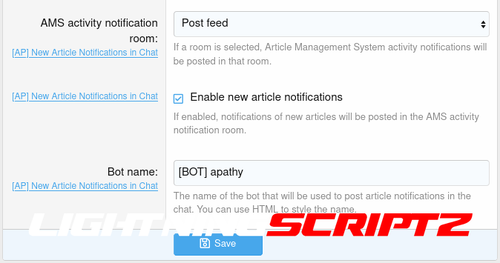
This simple addon extends Siropu Chat 2 with the ability to send "New article" notifications to the chat.
- 0 Downloads
-
With this add-on you can present your users an advent calendar.
Features:
2 calendar modes (image & set*) There are 3 possible options for a door: a) Simple info text b) Question/answer game (With checkbox to confirm the conditions of participation. With link to a help page.) c) Simple participation (With checkbox to confirm the conditions of participation. With link to a help page. ) In the texts the variable {username} is possible For each day, the choice of whether the user must accept the conditions of participation Import / Export days When creating a new year, there is the possibility to do this based on the data of another year. List of participants Captcha for question and participation days. Generation of the winners and sending of a PN to the winners. Participants may be excluded prior to winner generation. Option to exclude certain users from winning but still be able to play. Option to exclude certain groups from winning but still be able to play. Statistics in the frontend Statistics based on permission Navigation entry is optional Snowflakes function Countdown page until the start of the Advent calendar and many other options
- 0 Downloads
-
Basic Informations :
Addon name : [ConceptNGo] FontAwesome User Icon Version : 1.0.0 XF version : 2.0 and futher Presentation :
This addon allow to you add an FontAwesome icon on front of username, this icon is personnalizable inside settings of user groups.
You don't need to install FontAwesome manualy, it is directly include in XenForo
But if you want use pro icons, you must add your FontAwesome kit inside your style.
- 3 Downloads