
Barry Brennan
Uploader
-
Joined
-
Last visited
Everything posted by Barry Brennan
-
 This app adds a tab to the navigation, allowing your selected member groups to view all members of your board in a neat grid. Functions: Adds a tab to the navigation bar Shows a list of your registered members Search for participant content at the touch of a button Show a list of member information on your board Shows a group of users Shows the user principal ID Shows the number of user subscribers Shows the amount of user content Shows the ratio of the number of user messages per day Shows the number of days won by the user Shows the date users joined Shows the number of days during which the user was registered on the site. Shows the online status of participants Shows the last activity of participants Shows the birthday of the participants Shows the age of participants Shows the participants' time zone Shows the last used participant device Show list of member clubs they have joined All of the above information can be shown or hidden in the ACP (YOU ARE NOT REQUIRED TO SHOW ALL), you can also choose which groups of users can view each bit of information Sort list by Registration Date Number of messages Username Group of participants Custom sorting by Number of messages ( ANY, MORE X SUM, LESS X SUM, EXCLUSIVE X SUM) Reputation Points (ANY, MORE THAN X AMOUNT, LESS X AMOUNT, EXCLUSIVE X AMOUNT) Date of accession ( BETWEEN ) Last visit ( BETWEEN ) Last Post ( BETWEEN ) Choose which user groups can use/view the members tab IPS Version 4.7
 -
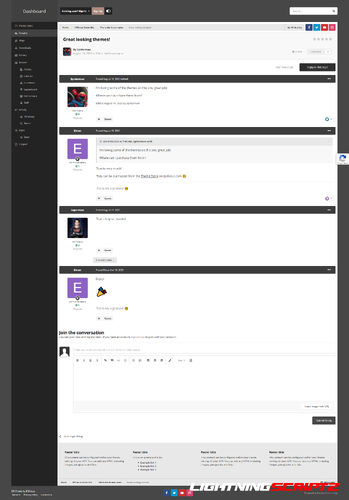 IpSFOCUS Dashboard style. Dashboard is a feature-rich IPS theme that includes a beautiful blur effect behind the vertical navigation bar, a background changer, and "transparent" bars that allow the background image to change certain inner areas of the theme. Demo: https://www.ipsfocus.net/themes/theme.php?id=55
 -
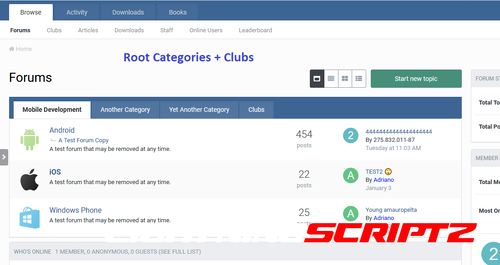 About This File Apps will display categories/forums as tabs in the forum index. Create your own tabs: You can create as many tabs as you want. There are 4 types of tabs: All Root Categories: One tab will be added for each root category. Specific Root Categories: You can choose how many root categories you want to display on the tab. Specific Forums: You can choose how many forums you want to display in a tab Individual Club Forums: You can choose which club forums you want to display in the tab. Multi-language support: You can give the tabs different names depending on the languages installed on your board. Permission tab: You can also choose which groups of users can view each tab. On the style tab: Table view Grid view Notes: This will add a new display option to the index if you allow members to choose the type of forum view. The second line of tabs will appear if you have many root categories. Less is more. Compatibility : 4.7
 -
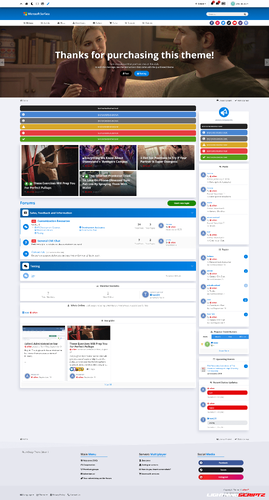 What's New in Version 4.1.0 Removed IPS 4.6 support, Add support for IPS 4.7, Updated swiperjs to version 8.3.0, Update jscolor to 2.4.8.
- 1 review
-
-

- 5
-
-
 Remove admin email/mailing list from all locations in IPS.
 -
 Plugin to add reputation information, days won, etc. to the user's dashboard in the topics. There are settings for selecting the desired display elements. The settings are divided into two sections - Abbreviated and Full. Abbreviated include: Standard design of the postcontainer. Number of posts. Number of topics. Number of reputations. Number of decisions. Number of days won. The number of registered days on the forum. Custom fields. Achievement badges. Progress rank. In full: Non-standard postcontainer with tiles. Adjust shadows for dark and light themes. Add a profile background. Hide the standard group (name + icon). Hide a standard group (name). Add a group. Add a secondary group. Add a rank. Number of posts. Number of topics. Number of reputations. Number of decisions. Number of days won. Number of subscribers. The number of registered days on the forum. Date of registration. The ID of the profile. The last activity on the forum. Time zone. The sign-in device. Custom fields. Additional panel with sending drugs, adding to the emergency, etc. Achievement badges. Progress rank. Flexible postcontainer settings. Tested on templates: Standard, Magnum, Fluent. Compatible with: Advanced Online Indicator. Recommendations: For correct operation, it is desirable to have a standard postcontainer.
 -
 This plugin adds your community version to the end of the copyright bar. It has only one setting that allows you to hide the version number from certain groups.
 -
 Ready for a gamer theme? If you are, then look at this beautiful and clean theme called “Pad” , Pad is packed with great features and admin options The styling options are also top notch, with lots of color pickers in the admin area that will help you customize the look and feel of your community in detail. In the same time, we haven’t forgot about font variations (Google Fonts is integrated with this theme)
 -
 Features Serve Google Tag Manager JavaScript from your own domain Normally, Google forces browsers to re-download the JavaScript every 15 minutes, which can hurt your site rendering speed. If you choose to serve it from your own domain, the time between re-downloads is set to 30 days. It also allows you to serve it from the network edge (for example cached in Cloudflare's data centers). Google Analytics API usage for: Setup/configuration Selection of existing measurement ID Optionally create a new property/data stream Setup of custom dimensions specific to XenForo for reporting Reporting from within XenForo admin area Backend data collection Ability to track XenForo overlay system as page views Track registered members across multiple devices Track the style being used Track nodes Track threads with or without the thread's first tag Track client-side errors Console errors JavaScript errors Images not loading Track user registrations and logins includes how they are registering/logging in (for example which type of connected account) Track new threads and replies Track new profile posts and comments Track new conversations and replies Track emails being sent and opened incudes email subject Done with backend data collection (multi-threaded with Guzzle's promise system so it doesn't slow down mass sending of emails). Track attachment views/downloads Track users using XenForo share buttons includes which platform they are sharing to Track users using XenForo's bookmark system Track user upgrades as e-commerce Views Begin checkout Purchase Track Google AdSense impressions and clicks Track user's user group (set user groups in a priority order for the one to track) Track links from RSS feed by source/medium Track links from emails by source/medium Track scrolling down page Track YouTube video engagement Start Progress Complete Track outbound links being clicked Track site searches Google Analytics reporting within XenForo admin Realtime map showing the countries users currently on your site are in Weekly heat maps Charts Report of client-side errors Some things to note: Does not work with Universal Analytics, only Google Analytics 4 (Universal Analytics is being deprecated and will cease processing new hits on July 1, 2023). You need to link your Google Analytics account and pick your property under Admin -> Options -> Analytics The Analytics Admin API currently can't enable Enhanced Measurement for your property's data stream. For the time being, you will need to go into your Google Analytics account, go to Admin -> Property -> Data Stream, and enable Enhanced measurement if you want to track the things enhanced measurement tracks. Once Google sorts it out with the Admin API, it will be something we can automatically do. [Google Analytics Admin API changelog] In exchange for being free, this addon has a single attribution link buried on the bottom of XenForo's Help -> Privacy policy page (there are no site-wide or footer links).
 -
 Allows to edit member user groups by moderators with permission in public interface and with some constraints. .png Requirements: XenForo 2.2.0+
 -
 Checks for duplicate user accounts. If two or more valid users have logged into your forum with the same IP and User Agent, they will be flagged as duplicate and the admin will receive an email. Features: Checks for duplicate IP and User Agent. Checks for user_state of 'valid'. All phrases start with duplicateaccountcheck_ for your convenience. Installation: Download Andy-DuplicateAccountCheck-1.4.zip and unzip it. Copy the src/addons/Andy/DuplicateAccountCheck directory to your server. From the Admin Control Panel Install the add-on. Database changes: This add-on will add a table called 'andy_duplicate_account_check' to your database.
 -
 More UI. X Features: Standard, floating, or sticky navigation and userbar Right to left support Dozens of different search bar and navigation position variations Collapsible nodes, sidebar, postbit, and signatures Many types of category description types (tooltip, inline, or none at all) Social Media icons can easily be moved down to the footer or to the logo block Different login styles such as modal window, dropdown, and slideout Option to enable avatars based on Material Design's color system Option to remove the forum list page actions (New Posts and Post New Thread buttons)
 -
_Secondary_Groups_Indicator.png.d44a233d76266341ae57eca1fa36a58b.thumb.png.6844b0d2c938234f0962a5e595dba9ee.png) Display of secondary user groups in topics, profile cards, search, profile. There are flexible settings. What's New in Version 4.0.0 Added templates for pHTML files. Added new settings for displaying groups in profile and themes.
Display of secondary user groups in topics, profile cards, search, profile. There are flexible settings. What's New in Version 4.0.0 Added templates for pHTML files. Added new settings for displaying groups in profile and themes. -
-
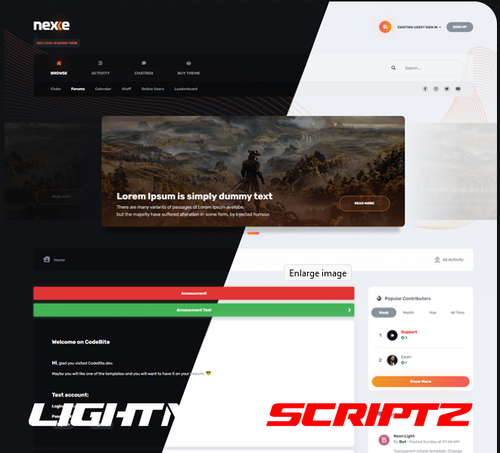 Template with a choice of ( light/dark ) color versions. Colors and sizes using CSS Vars. Choosing the font color, the theme has many settings and can be fully customized. It's perfect for all forums, beautifully displaying all site content. Possibility to change header, slider, navigation, popus, forms, comments and much more..
 -
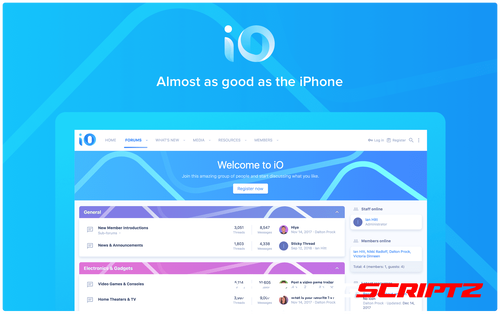 iO This vibrant, minimalist theme with concepts from Apple’s Human Interface Guidelines creates a professional forum that stands out. Your forum and discussions will flow with the clean and subtle design. Make iO unique with category strips that automatically change color based on your primary brand color. Built with the UI.X 2 framework Clean typography Uses material line icons Full page animations on page load Uses a tab bar at the bottom of the screen on mobile devices Full height iOS-style modals Category strips that automatically change color based on your primary brand color
 -
 This is a free product with any purchase of UI.X 2 for XenForo 2 with an active license. Use coupon code ClassicDarkFreeUIX2 if you have UI.X 2 and ClassicDarkFreeUIX2Dark if you have UI.X 2 Dark. See UI.X 2 for coupons as well if coming from XenForo 1. More UI.X Classic Dark Features: Standard, floating, or sticky navigation and userbar Right to left support Dozens of different search bar and navigation position variations Collapsible nodes, sidebar, postbit, and signatures Many types of category description types (tooltip, inline, or none at all) Social Media icons can easily be moved down to the footer or to the logo block Different login styles such as modal window, dropdown, and slideout Option to enable avatars based on Material Design's color system Option to remove the forum list page actions (New Posts and Post New Thread buttons)
 -
 The application updates the Font Awesome icons on the forum to the 6th version, without destroying the icons built into IPS. Official website of icons: https://fontawesome.com/v6/search If something doesn't work, clear the cache via AdminCP, under Support! Updated for Font Awesome 6.1.2. Full list of changes: https://fontawesome.com/docs/changelog/ IPS Version 4.7
 -
 A number of helper utilities designed to ease add-on development, does not have any direct user-facing changes. Uploaded to the resource manager to aid dependency tracking and allow updating without updating every individual add-on
 -
 This is a shoutbox widget that you can add in any of the available widget positions. Options: Minimum age required - Enable shoutbox based on user's age. Shoutbox refresh interval - Allows you to set refresh interval for new messages. This option can be disabled. Shoutbox refresh timeout - Stop refresh interval for inactive users after x minutes Delete shouts older than - Allows you to auto-delete shouts older than x days. Auto prune shoutbox every x hours. Auto plum message. Enable navigation tab - Allows you to chat in a dedicated page Enable sound - Enable sound notification for new shouts. Enable avatars - Display user avatar in shout. Allow BB codes - Controls if BB codes are parsed or not. Enable auto link - Auto link/embed URLs and media sites. Enable smilie button - For easy smilie access. Reverse ordering - Place input box at the bottom and display new messages from the bottom to the top Quick user tagging button with shout highlight. Footer - Allows you to add custom content (text, ads, etc) in the shoutbox footer. Thread ID - Post shouts in a dedicated thread as well. Thread message minimum length - Set minimum length required for shouts. Ban users with ban list Archive with option to search by user and keywords It has user group permissions for using shoutbox, editing/deleting shouts, prune shoutbox (/prune) When scrolling at the bottom of the shouts, older shouts will be automatically loaded. Compatible XF Versions , 2.2
 -
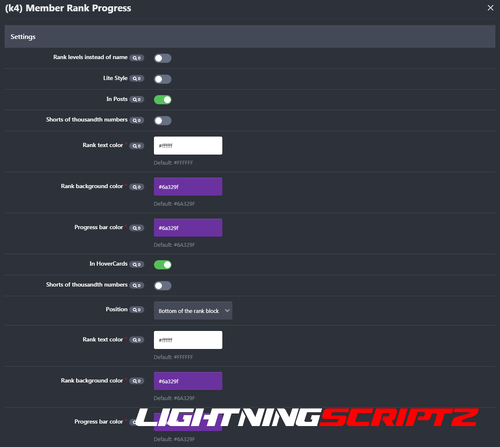 Plugin to display the progress of ranks (achievement system in IPS 4.6+) in themes and profile card. What's New in Version 1.1.0 Added position selection in posts. IPS Version 4.7
 -
 Add the possibility to export & import widgets. Can export specific widgets to XML file. Can import widgets from an uploaded XML file. Can delete all widgets with a one-click button.
 -
 This is very simple chat system with the basic features: Ajax chat, auto update. Display as a widget, so you can place it in sidebar or top page. Sound notification. User can toggle on/off. Admins/Moderators can block users. Load more messages when scrolling end (or top). Rules. Supports emoticons, URL, Images (GIF, PNG, JPG) *NEW* Supports GIPHY to finds GIFs and Stickers by using /giphy command (Eg: /giphy happy new year) *NEW* Supports Youtube, playing video in iframe and popup @mention by clicking on usernames. Flood control. Bad word filters. Time format. Display newer messages in top or bottom. Permissions for viewing, chatting & management. Edit/Delete messages.
 -
 Shortly after we released XenForo 2.2.10 we became aware of a number of minor issues that may have affected a number of customers. Therefore, today, we have released XenForo 2.2.10 Patch 1 to rectify these issues.
 -
 Based off it’s XenForo 1 successor, Abyss still brings many of the same features to XenForo 2. Features include a flat, modern design with a hand-crafted and detailed interface design which is integrated with UI.X 2. Abyss brings it’s darker look which suitable for any forum along with many different abilities that allow you to switch out the background image, a node grid management system, and so much more which was offered in it’s XenForo 1 version. Abyss Features [TH] Nodes Included, More Coming Soon! When purchasing Abyss, you get a free [TH] Nodes license. It is automatically created after you checkout. You can learn more about [TH] Nodes here. More Abyss Features: Standard, floating, or sticky navigation and userbar Flat modern design Dozens of different search bar and navigation position variations Collapsible nodes, sidebar, postbit, and signatures Many types of category description types (tooltip, inline, or none at all) Different login styles such as modal window, dropdown, and slideout Option to remove the forum list page actions (New Posts and Post New Thread buttons) Option to enable avatars based on Material Design's color system Switch out the background image, node grid management, and so much more!